> ## Documentation Index
> Fetch the complete documentation index at: https://docs.junojourney.com/llms.txt
> Use this file to discover all available pages before exploring further.
# Admin Overview
> The admin panel — manage users, content, analytics, budget, and platform settings.
export const RelatedPages = ({pages = []}) => {
if (pages.length === 0) return null;
return <>
Related articles
{pages.map(page => )}
;
};
export const RoleBadge = ({roles = []}) => {
const colorMap = {
Admin: "yellow",
Manager: "blue",
Learner: "green",
"Co-editor": "purple"
};
return <>
{roles.map(role => {role}{" "})}
;
};
## Admin panel
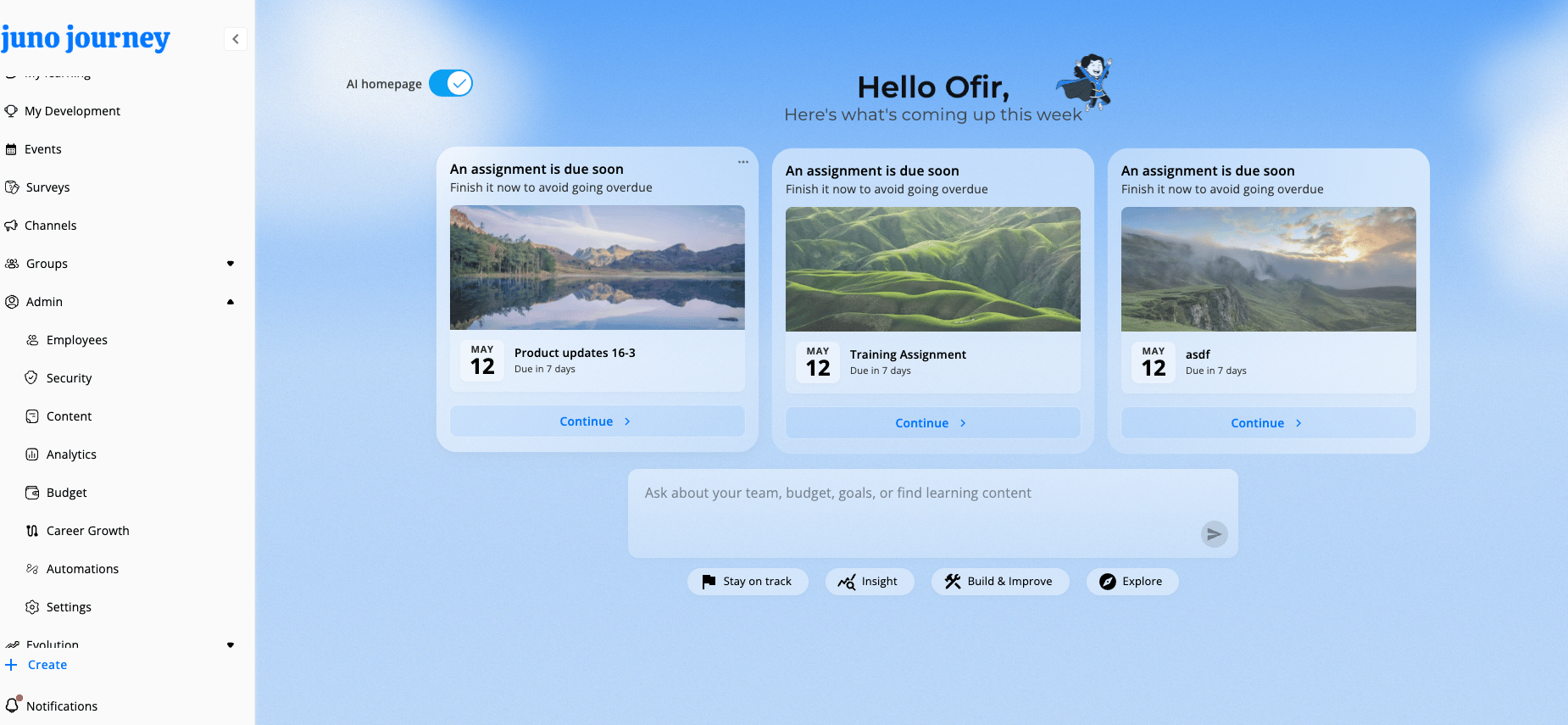
The **Admin** section appears in your sidebar when you have an Admin role (or a domain-admin role). It's the control center for managing your entire Juno instance.
What you see in the Admin dropdown depends on your role, the modules enabled for your org, and feature flags. If something below isn't visible, ask your admin or CSM to enable the relevant module/flag.
 ***
## Panel tabs
| Tab | What it manages | Key features | Requires |
| --------------------------------------------- | ------------------------------ | -------------------------------------------------------------- | ---------- |
| **[Employees](/admin/managing-users)** | User accounts and roles | User table, import/export, profile management | — |
| **[Content](/admin/content-management)** | Learning content lifecycle | Content analytics, learning management, events, certifications | — |
| **[Analytics](/admin/analytics-and-reports)** | Data and reports | Dashboards, widget builder, skills analytics, reports | — |
| **[Budget](/admin/budget-and-credits)** | Budget allocation and spending | Overview, requests, credits, policies, payments | LXP module |
| **[Settings](/admin/customization)** | Platform configuration | Profiles, skills, providers, notifications, AI, text & labels | — |
***
## Standalone admin areas
These sections have their own dedicated pages, accessible from the sidebar:
| Section | What it manages | Requires |
| ----------------------------------------- | ---------------------------------------------- | ---------------------------------- |
| **[Security](/admin/roles-and-security)** | SSO configuration, user sync, access control | IT Admin role |
| **[Career Growth](/admin/career-growth)** | Positions, career paths, competency mapping | `CAN_SEE_CAREER_PATHS` flag |
| **[Automations](/admin/automations)** | Rule-based workflow triggers and notifications | `CAN_SEE_COMPANY_AUTOMATIONS` flag |
***
## Sidebar navigation
The Admin dropdown only renders for users with an Admin role or a domain-admin role, on non-mobile screens. Items appear in this order:
| Item | Visible when |
| ------------- | ---------------------------------------------------------------------- |
| Employees | Admin role (or `IT_ADMIN`, or `users` route permission) |
| Reviews | Admin role **and** Feedback module enabled |
| Security | **`IT_ADMIN` role only** |
| Content | Admin role (or `content` route permission) |
| Analytics | Manager role or higher (or `analytics` route permission) |
| Budget | Manager role or higher (or `BUYER` role) **and** LXP module |
| Career Growth | Admin role **and** `CAN_SEE_CAREER_PATHS` flag |
| Automations | Admin role **and** `CAN_SEE_COMPANY_AUTOMATIONS` flag |
| Settings | Admin role (or `settings` / `managerCanSeeProfiles` route permissions) |
Each item opens the corresponding tab or standalone page.
***
## Panel tabs
| Tab | What it manages | Key features | Requires |
| --------------------------------------------- | ------------------------------ | -------------------------------------------------------------- | ---------- |
| **[Employees](/admin/managing-users)** | User accounts and roles | User table, import/export, profile management | — |
| **[Content](/admin/content-management)** | Learning content lifecycle | Content analytics, learning management, events, certifications | — |
| **[Analytics](/admin/analytics-and-reports)** | Data and reports | Dashboards, widget builder, skills analytics, reports | — |
| **[Budget](/admin/budget-and-credits)** | Budget allocation and spending | Overview, requests, credits, policies, payments | LXP module |
| **[Settings](/admin/customization)** | Platform configuration | Profiles, skills, providers, notifications, AI, text & labels | — |
***
## Standalone admin areas
These sections have their own dedicated pages, accessible from the sidebar:
| Section | What it manages | Requires |
| ----------------------------------------- | ---------------------------------------------- | ---------------------------------- |
| **[Security](/admin/roles-and-security)** | SSO configuration, user sync, access control | IT Admin role |
| **[Career Growth](/admin/career-growth)** | Positions, career paths, competency mapping | `CAN_SEE_CAREER_PATHS` flag |
| **[Automations](/admin/automations)** | Rule-based workflow triggers and notifications | `CAN_SEE_COMPANY_AUTOMATIONS` flag |
***
## Sidebar navigation
The Admin dropdown only renders for users with an Admin role or a domain-admin role, on non-mobile screens. Items appear in this order:
| Item | Visible when |
| ------------- | ---------------------------------------------------------------------- |
| Employees | Admin role (or `IT_ADMIN`, or `users` route permission) |
| Reviews | Admin role **and** Feedback module enabled |
| Security | **`IT_ADMIN` role only** |
| Content | Admin role (or `content` route permission) |
| Analytics | Manager role or higher (or `analytics` route permission) |
| Budget | Manager role or higher (or `BUYER` role) **and** LXP module |
| Career Growth | Admin role **and** `CAN_SEE_CAREER_PATHS` flag |
| Automations | Admin role **and** `CAN_SEE_COMPANY_AUTOMATIONS` flag |
| Settings | Admin role (or `settings` / `managerCanSeeProfiles` route permissions) |
Each item opens the corresponding tab or standalone page.