> ## Documentation Index
> Fetch the complete documentation index at: https://docs.junojourney.com/llms.txt
> Use this file to discover all available pages before exploring further.
# Settings & Customization
> Admin Tab 4 — profiles, skills, providers, notifications, AI settings, text & labels.
export const RelatedPages = ({pages = []}) => {
if (pages.length === 0) return null;
return <>
Related articles
{pages.map(page => )}
;
};
export const RoleBadge = ({roles = []}) => {
const colorMap = {
Admin: "yellow",
Manager: "blue",
Learner: "green",
"Co-editor": "purple"
};
return <>
{roles.map(role => {role}{" "})}
;
};
## Overview
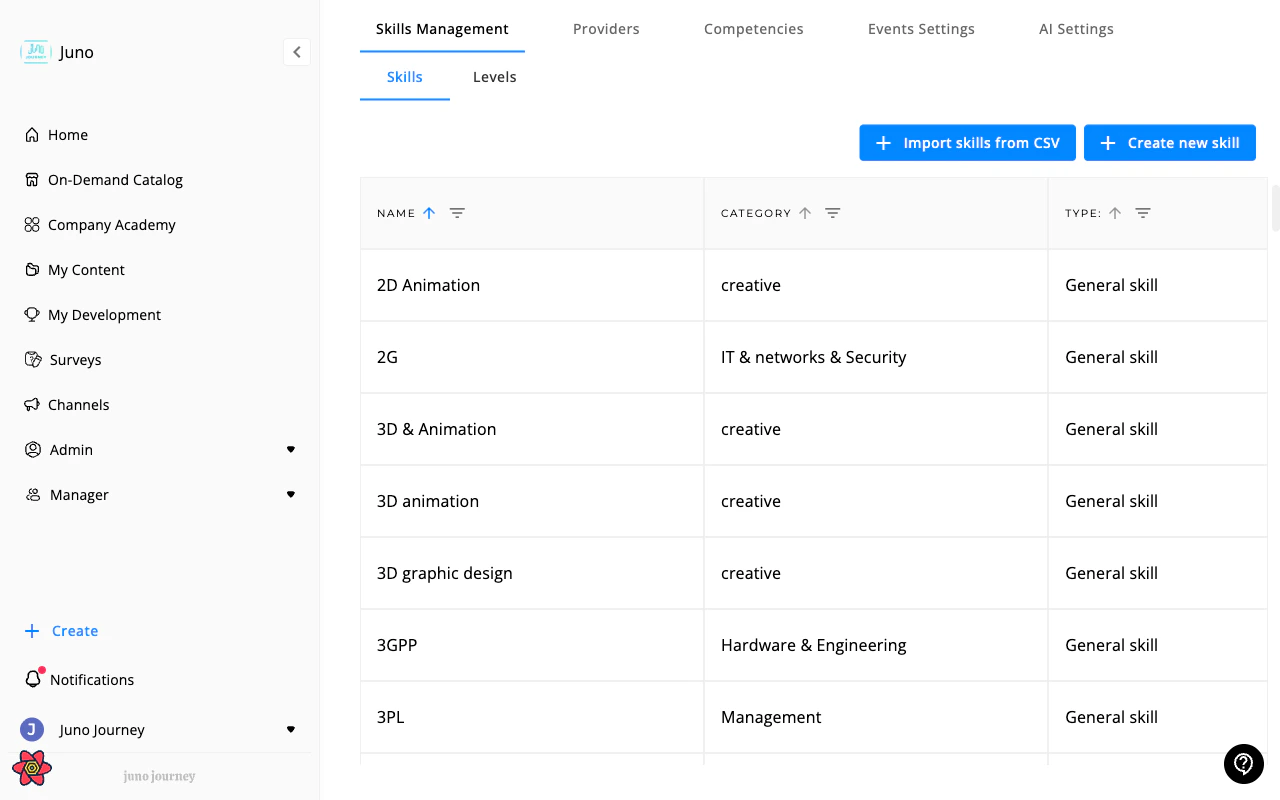
**Admin → Settings** (`/admin/4`) is the platform configuration hub. Managers have limited access; most sections require Admin role.
 ***
## Sub-tabs
### Profiles
Define job profiles for your organization:
* Create role/position profiles
* Link required competencies to profiles
* Used for career path mapping and PDP generation
### Skills management
Define your organization's skills taxonomy:
* Create skill categories and individual skills
* Define skill levels (e.g., Beginner → Expert)
* Link skills to positions and competencies
### Providers
Manage external content provider integrations:
* Connect providers (Udemy, Coursera, LinkedIn, Pluralsight, etc.)
* Configure API credentials
* Manage custom websites (if enabled)
### Company levels
Define organizational levels for career mapping:
* Set level hierarchy (IC levels, management levels)
* Used in career paths and competency frameworks
Requires `CAN_SEE_NEW_SKILL_LEVELS` feature flag.
### Competencies
Manage competency frameworks:
* Create competency categories and individual competencies
* Define assessment criteria
* Link to feedback cycles and career paths
Requires `CAN_SEE_COMPETENCIES` feature flag.
### Notifications
Configure system notification settings:
* Email templates and delivery settings
* Notification channel preferences (email, Slack, Teams, SMS)
* Due date reminder configuration
Requires `CAN_SEE_NOTIFICATIONS_TAB_ADMIN` feature flag.
### Events settings
Configure event-related platform settings:
* Default event settings
* Calendar integration options
* Session registration policies
### AI settings
Configure the Juno assistant and AI features:
* External app integrations (Google Calendar, Drive, JIRA)
* AI model settings
* Supervisor agent configuration
Requires Admin role (level 5+) and AI features to be enabled.
See also: [AI Settings](/admin/ai-settings) for detailed configuration.
### Text & labels
Customize the text users see throughout Juno:
* **Sidebar navigation** — rename menu items
* **Tab labels** — customize tab names
* **Academy labels** — rename "Company Academy", "Catalog", etc.
* **Career Growth text** — customize career path terminology
* **Goal creation text** — customize AI prompts
Supports multiple languages. Includes AI-powered translation for quick multi-language setup. Reset any customization to defaults at any time.
Requires `useCanCustomizePlatformText` feature flag.
***
## Sub-tabs
### Profiles
Define job profiles for your organization:
* Create role/position profiles
* Link required competencies to profiles
* Used for career path mapping and PDP generation
### Skills management
Define your organization's skills taxonomy:
* Create skill categories and individual skills
* Define skill levels (e.g., Beginner → Expert)
* Link skills to positions and competencies
### Providers
Manage external content provider integrations:
* Connect providers (Udemy, Coursera, LinkedIn, Pluralsight, etc.)
* Configure API credentials
* Manage custom websites (if enabled)
### Company levels
Define organizational levels for career mapping:
* Set level hierarchy (IC levels, management levels)
* Used in career paths and competency frameworks
Requires `CAN_SEE_NEW_SKILL_LEVELS` feature flag.
### Competencies
Manage competency frameworks:
* Create competency categories and individual competencies
* Define assessment criteria
* Link to feedback cycles and career paths
Requires `CAN_SEE_COMPETENCIES` feature flag.
### Notifications
Configure system notification settings:
* Email templates and delivery settings
* Notification channel preferences (email, Slack, Teams, SMS)
* Due date reminder configuration
Requires `CAN_SEE_NOTIFICATIONS_TAB_ADMIN` feature flag.
### Events settings
Configure event-related platform settings:
* Default event settings
* Calendar integration options
* Session registration policies
### AI settings
Configure the Juno assistant and AI features:
* External app integrations (Google Calendar, Drive, JIRA)
* AI model settings
* Supervisor agent configuration
Requires Admin role (level 5+) and AI features to be enabled.
See also: [AI Settings](/admin/ai-settings) for detailed configuration.
### Text & labels
Customize the text users see throughout Juno:
* **Sidebar navigation** — rename menu items
* **Tab labels** — customize tab names
* **Academy labels** — rename "Company Academy", "Catalog", etc.
* **Career Growth text** — customize career path terminology
* **Goal creation text** — customize AI prompts
Supports multiple languages. Includes AI-powered translation for quick multi-language setup. Reset any customization to defaults at any time.
Requires `useCanCustomizePlatformText` feature flag.