> ## Documentation Index
> Fetch the complete documentation index at: https://docs.junojourney.com/llms.txt
> Use this file to discover all available pages before exploring further.
# Managing Users
> Add, edit, deactivate, sync, import/export, and configure custom attributes for user accounts in Juno.
export const InternalNote = ({children}) => {
const [isInternal, setIsInternal] = useState(false);
useEffect(() => {
const user = window.__mintlify_user__;
if (user?.groups?.includes("internal")) setIsInternal(true);
}, []);
if (!isInternal) return null;
return
🔒 Internal Note
{children}
;
};
export const RelatedPages = ({pages = []}) => {
if (pages.length === 0) return null;
return <>
Related articles
{pages.map(page => )}
;
};
export const RoleBadge = ({roles = []}) => {
const colorMap = {
Admin: "yellow",
Manager: "blue",
Learner: "green",
"Co-editor": "purple"
};
return <>
{roles.map(role => {role}{" "})}
;
};
**Admin → Employees** (`/admin/0`) is where you manage every user in your org — accounts, roles, managers, custom attributes, bulk imports/updates, deactivation, and exports.
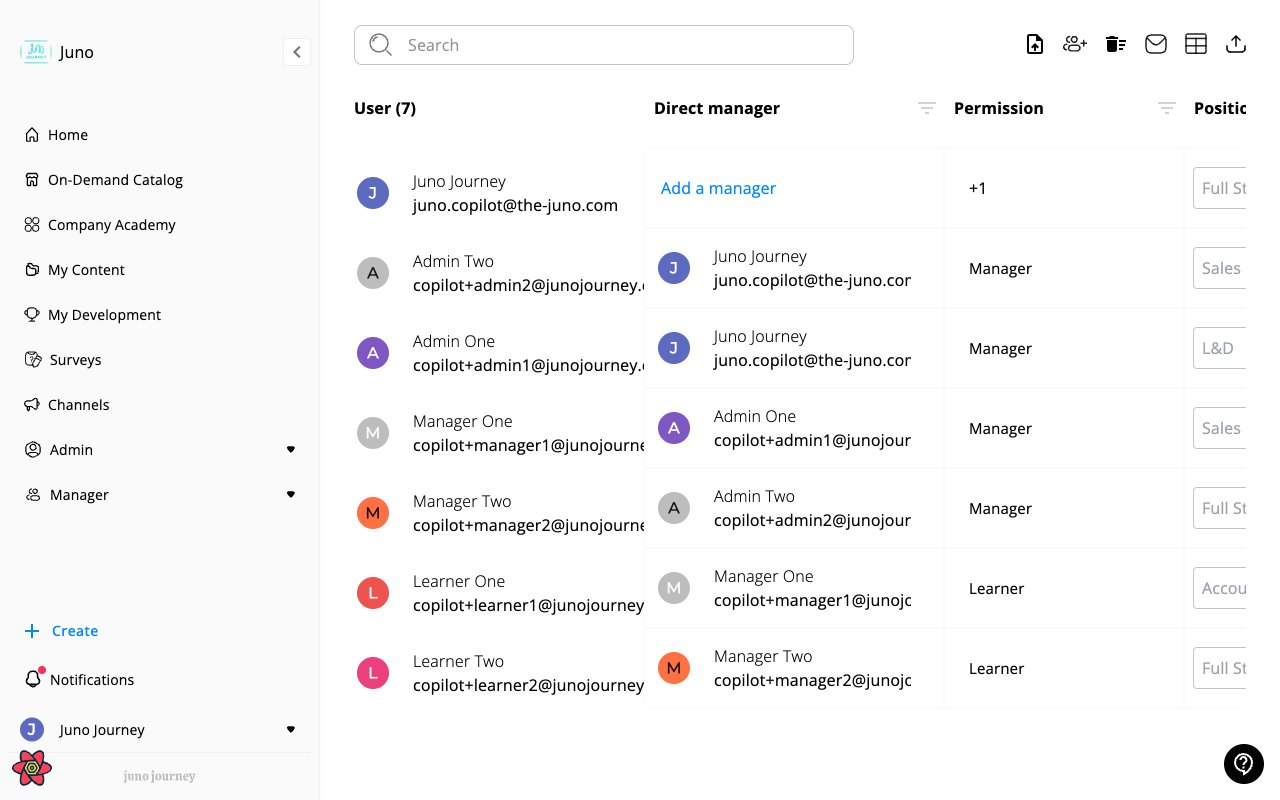 Access to this tab requires either the **Admin** role or a **People domain admin** role. Several actions on this page are gated by additional feature flags — see the action tables below.
***
## The users table
Each row is one user. The table supports server-side search, filter, sort, and column visibility. Use the **column picker** (checkbox icon in the top bar) to toggle which columns are visible.
Access to this tab requires either the **Admin** role or a **People domain admin** role. Several actions on this page are gated by additional feature flags — see the action tables below.
***
## The users table
Each row is one user. The table supports server-side search, filter, sort, and column visibility. Use the **column picker** (checkbox icon in the top bar) to toggle which columns are visible.
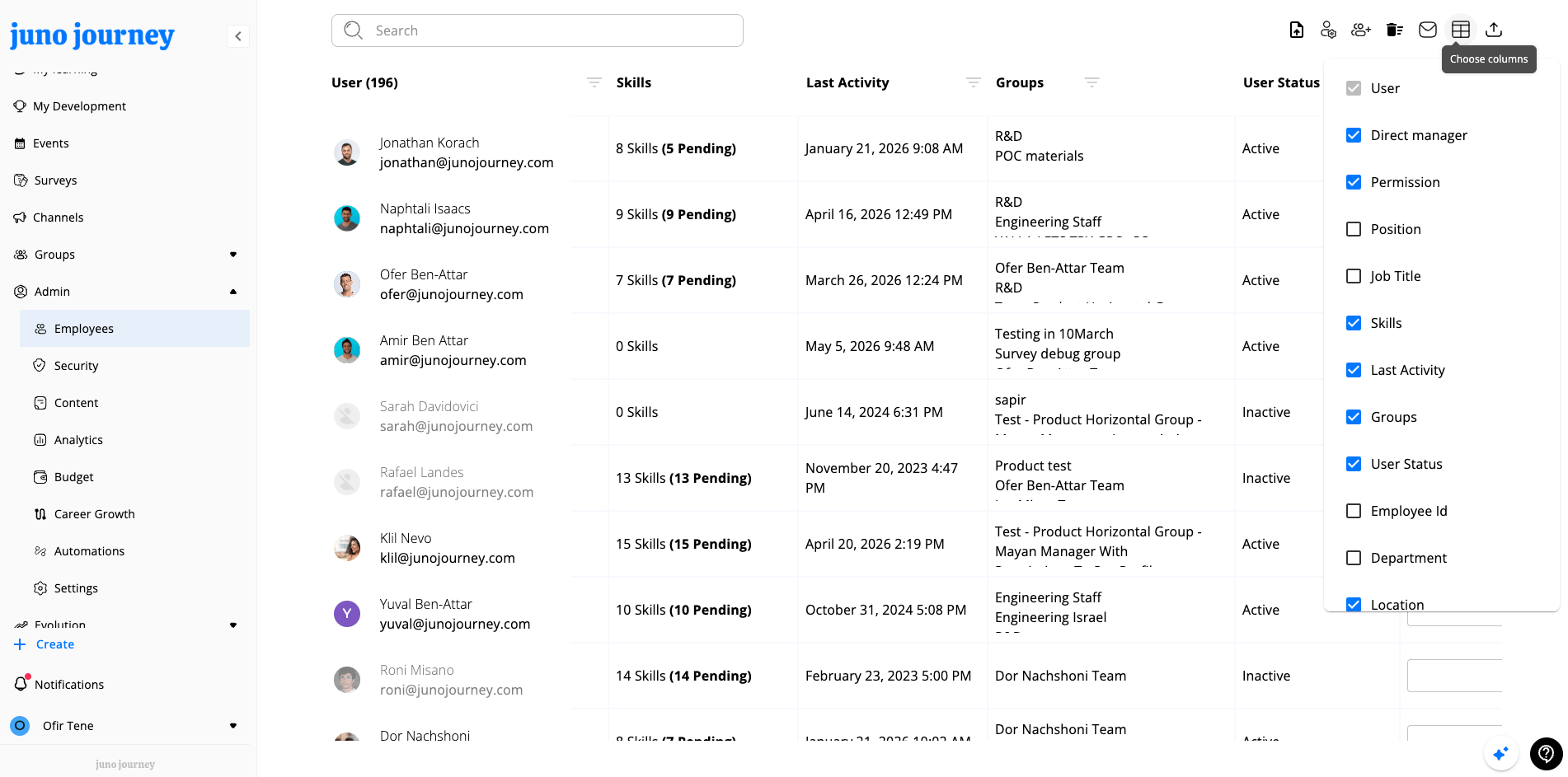 | Column | Sort | Filter | Default | Notes |
| ------------------ | :--: | :--------------: | :------: | ---------------------------------- |
| **User** | — | ✓ (autocomplete) | ✓ | Avatar, name, email |
| **Direct Manager** | — | ✓ (autocomplete) | ✓ | Reporting line |
| **Permission** | ✓ | ✓ (role enum) | ✓ | Role level |
| **Last Activity** | ✓ | ✓ (date range) | ✓ | Most recent login/action |
| **Skills** | ✓ | — | ✓ | Count of skills on the user |
| **User Status** | ✓ | — | ✓ | `active` / `inactive` / `invited` |
| **Managers** | — | ✓ (autocomplete) | optional | Full manager hierarchy (ancestors) |
| **Groups** | — | ✓ (group picker) | optional | Group memberships |
| **Department** | ✓ | ✓ (autocomplete) | optional | Org unit |
| **Company** | ✓ | ✓ (autocomplete) | optional | Company / sub-org |
Legacy table also exposes: Position, Job Title, Employee ID, Location, User Type, Hire Date, Deactivation Date, Phone Number.
Free-text search across the table is at the top.
***
## Top-bar actions
Buttons appear conditionally based on role and feature flags.
| Action | What it does | Gated by |
| ----------------------------------- | ---------------------------------------------------------------------------------------------------- | ----------------------------------------------------------------------- |
| **Add Users** | Open the create-user form (single user). | `addUser` route permission ≤ effective People role |
| **Update Users from CSV** | 4-step wizard to bulk-update users from an Excel/CSV file. | `UPDATE_USERS_EXCEL` flag |
| **Manage Custom Attributes** | Create / edit / delete custom user attributes. | `CAN_ADD_USERS_CUSTOM_ATTRIBUTES` flag |
| **Sync Users** | Trigger a sync from a configured directory integration (SCIM/SSO). | People domain role > Admin **and** users-integration mapping configured |
| **Send Invitation Email** | Send (or resend) the invite email to all pending/never-logged-in users in the current filtered view. | Effective People role ≥ Admin (5) |
| **Bulk Delete Users** | Wizard to delete many users by uploading a list of IDs. | Support level ≥ 2 (Juno staff) |
| **Deactivate Users from Excel/CSV** | Wizard to bulk-deactivate users by uploading an Excel or CSV file of email addresses. | `DEACTIVATE_USERS_EXCEL` flag **and** Support level ≥ 2 (Juno staff) |
| **Generate POC Passwords** | Generate temporary passwords for demo/POC tenants. | Tenant `purpose === "demo"` |
| **Export** | Download the current filtered view as Excel (or CSV). | — |
| **Column picker** | Toggle column visibility. | — |
***
## Adding a user
Click **Add Users** to open the create form. The dialog supports adding multiple users in one go (User #1, User #2, …) and a top-right **Send Invitations** checkbox controls whether invite emails go out on submit.
| Column | Sort | Filter | Default | Notes |
| ------------------ | :--: | :--------------: | :------: | ---------------------------------- |
| **User** | — | ✓ (autocomplete) | ✓ | Avatar, name, email |
| **Direct Manager** | — | ✓ (autocomplete) | ✓ | Reporting line |
| **Permission** | ✓ | ✓ (role enum) | ✓ | Role level |
| **Last Activity** | ✓ | ✓ (date range) | ✓ | Most recent login/action |
| **Skills** | ✓ | — | ✓ | Count of skills on the user |
| **User Status** | ✓ | — | ✓ | `active` / `inactive` / `invited` |
| **Managers** | — | ✓ (autocomplete) | optional | Full manager hierarchy (ancestors) |
| **Groups** | — | ✓ (group picker) | optional | Group memberships |
| **Department** | ✓ | ✓ (autocomplete) | optional | Org unit |
| **Company** | ✓ | ✓ (autocomplete) | optional | Company / sub-org |
Legacy table also exposes: Position, Job Title, Employee ID, Location, User Type, Hire Date, Deactivation Date, Phone Number.
Free-text search across the table is at the top.
***
## Top-bar actions
Buttons appear conditionally based on role and feature flags.
| Action | What it does | Gated by |
| ----------------------------------- | ---------------------------------------------------------------------------------------------------- | ----------------------------------------------------------------------- |
| **Add Users** | Open the create-user form (single user). | `addUser` route permission ≤ effective People role |
| **Update Users from CSV** | 4-step wizard to bulk-update users from an Excel/CSV file. | `UPDATE_USERS_EXCEL` flag |
| **Manage Custom Attributes** | Create / edit / delete custom user attributes. | `CAN_ADD_USERS_CUSTOM_ATTRIBUTES` flag |
| **Sync Users** | Trigger a sync from a configured directory integration (SCIM/SSO). | People domain role > Admin **and** users-integration mapping configured |
| **Send Invitation Email** | Send (or resend) the invite email to all pending/never-logged-in users in the current filtered view. | Effective People role ≥ Admin (5) |
| **Bulk Delete Users** | Wizard to delete many users by uploading a list of IDs. | Support level ≥ 2 (Juno staff) |
| **Deactivate Users from Excel/CSV** | Wizard to bulk-deactivate users by uploading an Excel or CSV file of email addresses. | `DEACTIVATE_USERS_EXCEL` flag **and** Support level ≥ 2 (Juno staff) |
| **Generate POC Passwords** | Generate temporary passwords for demo/POC tenants. | Tenant `purpose === "demo"` |
| **Export** | Download the current filtered view as Excel (or CSV). | — |
| **Column picker** | Toggle column visibility. | — |
***
## Adding a user
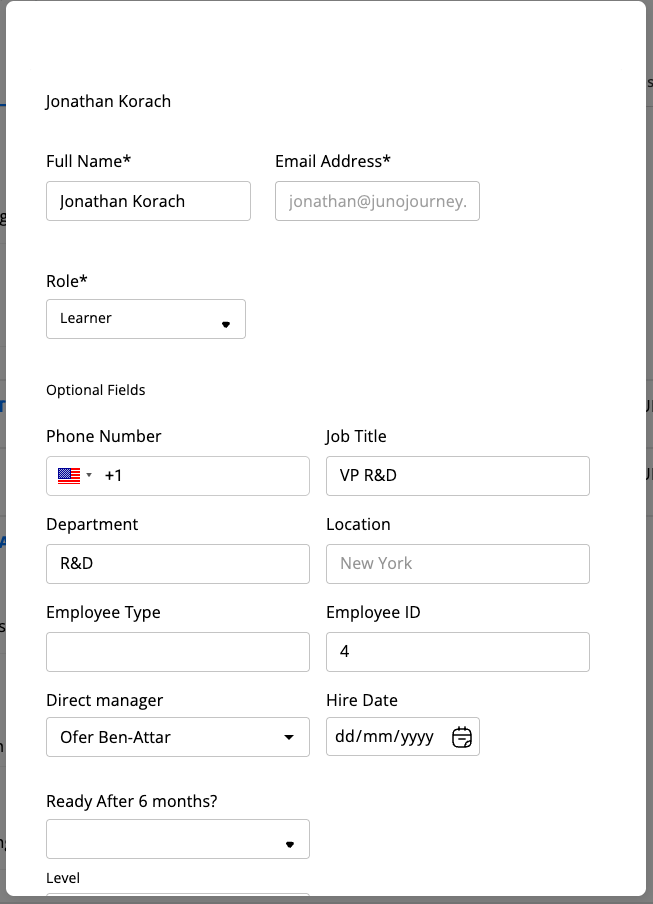
Click **Add Users** to open the create form. The dialog supports adding multiple users in one go (User #1, User #2, …) and a top-right **Send Invitations** checkbox controls whether invite emails go out on submit.
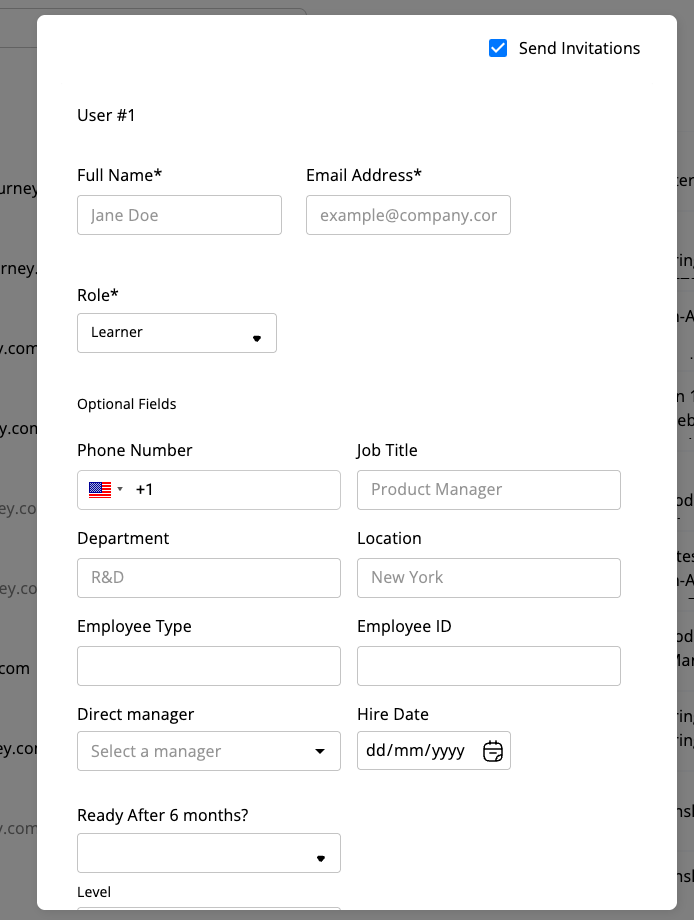 Fields:
| Field | Required | Notes |
| ----------------- | :-----------: | ---------------------------------------------------------------------------------------------------------------------------------------------------- |
| Full name | ✓ | |
| Email address | conditional\* | Required unless phone is provided |
| Role | ✓ | Filtered to roles ≤ your own; defaults to Learner |
| Phone number | — | International format with country flag |
| Job title | — | Free-text |
| Department | — | Free-text |
| Location | — | Free-text |
| Employee Type | — | Free-text |
| Employee ID | — | External ID |
| Direct manager | — | Autocomplete from existing users |
| Hire Date | — | `dd/mm/yyyy` |
| Custom attributes | — | All attributes defined under **Manage Custom Attributes** appear at the bottom of the form (see screenshot — "Ready After 6 months?", "Level", etc.) |
\* Email or phone is required.
When **Send Invitations** is checked, new users with an email receive a welcome / magic-link email immediately.
***
## The user detail page
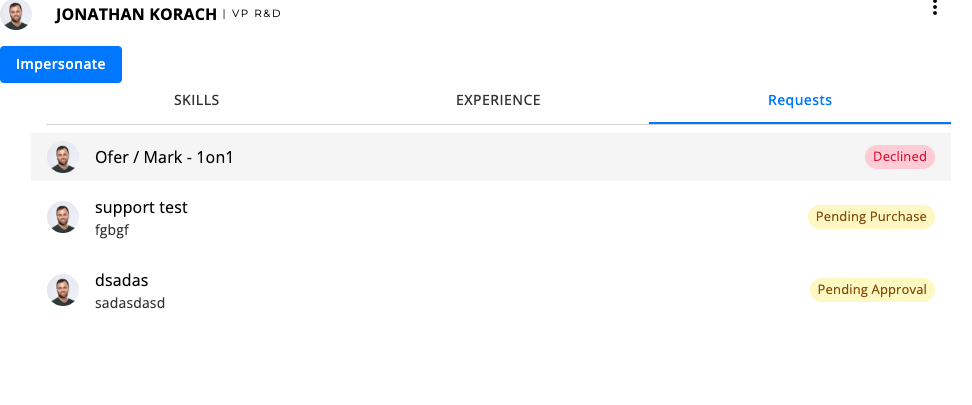
Click a user's name to open their detail page. It has tabs for **Skills**, **Experience**, and **Requests**, an **Impersonate** button (when allowed), and a three-dot **actions menu** in the top right.
Fields:
| Field | Required | Notes |
| ----------------- | :-----------: | ---------------------------------------------------------------------------------------------------------------------------------------------------- |
| Full name | ✓ | |
| Email address | conditional\* | Required unless phone is provided |
| Role | ✓ | Filtered to roles ≤ your own; defaults to Learner |
| Phone number | — | International format with country flag |
| Job title | — | Free-text |
| Department | — | Free-text |
| Location | — | Free-text |
| Employee Type | — | Free-text |
| Employee ID | — | External ID |
| Direct manager | — | Autocomplete from existing users |
| Hire Date | — | `dd/mm/yyyy` |
| Custom attributes | — | All attributes defined under **Manage Custom Attributes** appear at the bottom of the form (see screenshot — "Ready After 6 months?", "Level", etc.) |
\* Email or phone is required.
When **Send Invitations** is checked, new users with an email receive a welcome / magic-link email immediately.
***
## The user detail page
Click a user's name to open their detail page. It has tabs for **Skills**, **Experience**, and **Requests**, an **Impersonate** button (when allowed), and a three-dot **actions menu** in the top right.
 ### User actions menu
The three-dot menu in the user detail header exposes the per-user actions:
### User actions menu
The three-dot menu in the user detail header exposes the per-user actions:
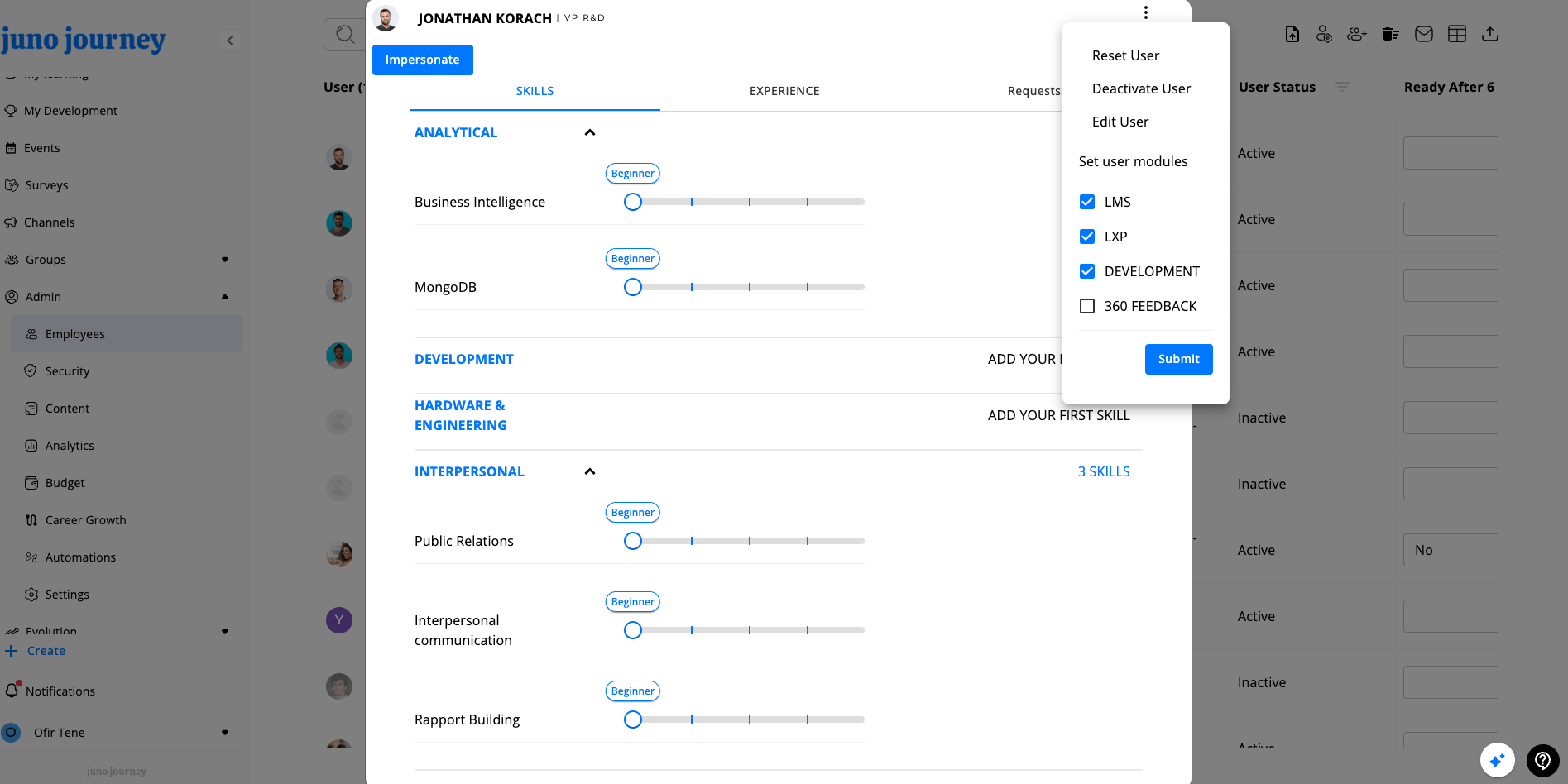 | Action | What it does | Gated by |
| ---------------------- | ------------------------------------------------------------------------------------------------------------------------ | ----------------------------- |
| **Edit User** | Open the user form pre-filled. **Email is read-only** in edit mode — every other field can be changed. | `CAN_EDIT_USERS` flag |
| **Reset User** | Reset the user's data/state (org-defined). | `CAN_RESET_USER` flag |
| **Deactivate User** | Block sign-in; preserve data. | `CAN_DEACTIVATE_USER` flag |
| **Delete User** | Permanently delete an **already-deactivated** user (only appears once user is inactive). | `CAN_DEACTIVATE_USER` flag |
| **Set user modules** | Inline checkbox group right in the menu: **LMS**, **LXP**, **DEVELOPMENT**, **360 FEEDBACK**. Click **Submit** to apply. | `CAN_EDIT_MODULES` flag |
| **Transfer ownership** | Reassign content/objects owned by the user. | `CAN_TRANSFER_OWNERSHIP` flag |
| **Impersonate** | Sign in as this user (separate button on the header, not in the menu). | LMS-only tenant configuration |
### Edit user dialog
Same layout as Add Users, with the email field disabled. All other fields (including custom attributes) can be changed.
| Action | What it does | Gated by |
| ---------------------- | ------------------------------------------------------------------------------------------------------------------------ | ----------------------------- |
| **Edit User** | Open the user form pre-filled. **Email is read-only** in edit mode — every other field can be changed. | `CAN_EDIT_USERS` flag |
| **Reset User** | Reset the user's data/state (org-defined). | `CAN_RESET_USER` flag |
| **Deactivate User** | Block sign-in; preserve data. | `CAN_DEACTIVATE_USER` flag |
| **Delete User** | Permanently delete an **already-deactivated** user (only appears once user is inactive). | `CAN_DEACTIVATE_USER` flag |
| **Set user modules** | Inline checkbox group right in the menu: **LMS**, **LXP**, **DEVELOPMENT**, **360 FEEDBACK**. Click **Submit** to apply. | `CAN_EDIT_MODULES` flag |
| **Transfer ownership** | Reassign content/objects owned by the user. | `CAN_TRANSFER_OWNERSHIP` flag |
| **Impersonate** | Sign in as this user (separate button on the header, not in the menu). | LMS-only tenant configuration |
### Edit user dialog
Same layout as Add Users, with the email field disabled. All other fields (including custom attributes) can be changed.
 Deactivation sets `inactive: true` in MongoDB **and** disables the Firebase auth record — both must update together. A sync mismatch causes intermittent login failures. Effective role of a deactivated user is `BLOCKED` (99). Deletion is only allowed after deactivation to avoid orphaning Firebase auth records.
***
## Update users from CSV
A 4-step wizard launched from the top bar. Use it to update many users at once (it does **not** create new users — use Add Users for that, or contact support for bulk-create from file).
1. **Upload file** — `.xlsx` or `.csv`.
2. **Map columns** — match each spreadsheet column to a user field (`displayName`, `primaryEmail`, `phoneNumber`, `role`, `department`, `location`, `jobTitle`, `modules`, `employeeId`, `managerId`, `userType`, `hireDate`, custom attributes).
3. **Migration policy** — pick how conflicts are resolved (overwrite, skip, append for list-typed fields).
4. **Preview** — review the diff before applying.
Errors and unchanged rows are surfaced in the preview step.
***
## Bulk deactivate users from Excel/CSV
Use this when you need to deactivate many users at once — for example, after an offboarding batch, an acquisition cleanup, or a contractor rotation. It's faster than opening each user and clicking **Deactivate User**, and it only requires the list of email addresses.
The action is gated by the `DEACTIVATE_USERS_EXCEL` feature flag (default: blocked) and requires **Support level ≥ 2** (Juno staff). Look for the **person-off** icon in the Employees top bar.
### What it does
* Reads email addresses from one column of an `.xlsx` or `.csv` file.
* Matches them to users in your tenant **case-insensitively** by `primaryEmail`.
* Sets `inactive: true` on each matched, currently-active user (same effect as the per-user **Deactivate User** action — sign-in is blocked, data is preserved, and the user's effective role becomes `BLOCKED`).
* Skips users that are already inactive and reports emails that don't match any user.
It does **not** delete users, transfer ownership, or change roles. To remove a user permanently, deactivate first and then use **Delete User** on the user detail page.
### Limits and safeguards
| Constraint | Value |
| ---------------------------------------------------------- | ------------------------------------------------------------------------- |
| Max emails per file | 5,000 |
| Min emails per file | 1 |
| File types | `.xlsx`, `.csv` |
| Juno internal emails (`@the-juno.com`, `@junojourney.com`) | Excluded by default; check **Allow Juno internal emails** to include them |
| Invalid or malformed emails | Juno skips them automatically and shows the count on the preview |
### Wizard steps
1. **Upload file** — drop in an `.xlsx` or `.csv`. Juno treats the first row as a header. Optionally check **Allow Juno internal emails** before uploading.
2. **Pick the email column** — if the file contains more than one column that looks like emails, select which one to use. Juno skips this step when it detects only one email column.
3. **Preview (dry run)** — Juno runs a server-side dry run and shows three groups:
* **To deactivate** — active users Juno will deactivate, with name and email.
* **Already inactive** — matched users that are already deactivated (no-op).
* **Not found** — emails with no matching user in the tenant.
4. **Confirm** — click **Deactivate** to apply. The result shows `deactivatedCount` and any `failedEmails` that errored during the write.
### Example file
A single column named `email` is enough:
```csv theme={null}
email
alex@example.com
sam@example.com
jordan@example.com
```
Extra columns are fine — you'll pick the email column in step 2.
### API reference
The wizard calls two endpoints. Both require an authenticated session with Support level ≥ 2.
| Method | Path | Purpose |
| ------ | ------------------------------------------------------ | ------------------------------- |
| `POST` | `/api/users-management/deactivate-users-excel-dry-run` | Preview matches without writing |
| `POST` | `/api/users-management/deactivate-users-excel` | Apply the deactivation |
Request body (both endpoints):
```json theme={null}
{
"emails": ["alex@example.com", "sam@example.com"],
"allowJunoInternalEmails": false
}
```
Dry-run response:
```json theme={null}
{
"toDeactivate": [
{ "_id": "…", "primaryEmail": "alex@example.com", "firstName": "Alex", "lastName": "Doe" }
],
"alreadyInactive": [
{ "primaryEmail": "sam@example.com", "firstName": "Sam", "lastName": "Lee" }
],
"notFound": ["jordan@example.com"]
}
```
Apply response extends the dry-run shape with the write outcome:
```json theme={null}
{
"toDeactivate": [ /* … */ ],
"alreadyInactive": [ /* … */ ],
"notFound": [ /* … */ ],
"deactivatedCount": 1,
"failedEmails": []
}
```
Implemented in `UsersManagementService.deactivateUsersByEmail{,DryRun}`. Matching is done with `$expr` + `$toLower` so stored mixed-case `primaryEmail` values still match. Writes go through `updateUserPromise` with `{ inactive: true }` at concurrency 10 — same code path as the single-user deactivate, so Firebase auth is disabled in lockstep. Failures land in `failedEmails`; rerun the wizard on that subset to retry. For runs near the 5,000 cap, expect the request to take a while — moving this to a background job is tracked as follow-up work.
***
## Custom attributes
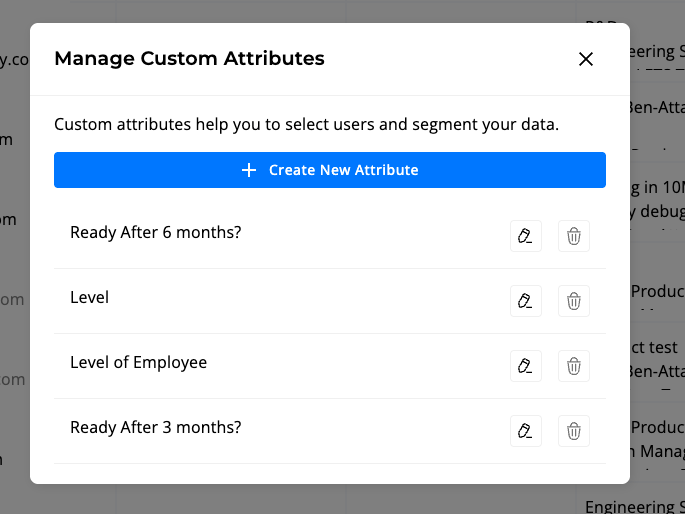
**Manage Custom Attributes** opens a dialog where you can define org-specific user fields. Click **+ Create New Attribute** to add one; use the pencil/trash icons to edit or delete an existing attribute.
Deactivation sets `inactive: true` in MongoDB **and** disables the Firebase auth record — both must update together. A sync mismatch causes intermittent login failures. Effective role of a deactivated user is `BLOCKED` (99). Deletion is only allowed after deactivation to avoid orphaning Firebase auth records.
***
## Update users from CSV
A 4-step wizard launched from the top bar. Use it to update many users at once (it does **not** create new users — use Add Users for that, or contact support for bulk-create from file).
1. **Upload file** — `.xlsx` or `.csv`.
2. **Map columns** — match each spreadsheet column to a user field (`displayName`, `primaryEmail`, `phoneNumber`, `role`, `department`, `location`, `jobTitle`, `modules`, `employeeId`, `managerId`, `userType`, `hireDate`, custom attributes).
3. **Migration policy** — pick how conflicts are resolved (overwrite, skip, append for list-typed fields).
4. **Preview** — review the diff before applying.
Errors and unchanged rows are surfaced in the preview step.
***
## Bulk deactivate users from Excel/CSV
Use this when you need to deactivate many users at once — for example, after an offboarding batch, an acquisition cleanup, or a contractor rotation. It's faster than opening each user and clicking **Deactivate User**, and it only requires the list of email addresses.
The action is gated by the `DEACTIVATE_USERS_EXCEL` feature flag (default: blocked) and requires **Support level ≥ 2** (Juno staff). Look for the **person-off** icon in the Employees top bar.
### What it does
* Reads email addresses from one column of an `.xlsx` or `.csv` file.
* Matches them to users in your tenant **case-insensitively** by `primaryEmail`.
* Sets `inactive: true` on each matched, currently-active user (same effect as the per-user **Deactivate User** action — sign-in is blocked, data is preserved, and the user's effective role becomes `BLOCKED`).
* Skips users that are already inactive and reports emails that don't match any user.
It does **not** delete users, transfer ownership, or change roles. To remove a user permanently, deactivate first and then use **Delete User** on the user detail page.
### Limits and safeguards
| Constraint | Value |
| ---------------------------------------------------------- | ------------------------------------------------------------------------- |
| Max emails per file | 5,000 |
| Min emails per file | 1 |
| File types | `.xlsx`, `.csv` |
| Juno internal emails (`@the-juno.com`, `@junojourney.com`) | Excluded by default; check **Allow Juno internal emails** to include them |
| Invalid or malformed emails | Juno skips them automatically and shows the count on the preview |
### Wizard steps
1. **Upload file** — drop in an `.xlsx` or `.csv`. Juno treats the first row as a header. Optionally check **Allow Juno internal emails** before uploading.
2. **Pick the email column** — if the file contains more than one column that looks like emails, select which one to use. Juno skips this step when it detects only one email column.
3. **Preview (dry run)** — Juno runs a server-side dry run and shows three groups:
* **To deactivate** — active users Juno will deactivate, with name and email.
* **Already inactive** — matched users that are already deactivated (no-op).
* **Not found** — emails with no matching user in the tenant.
4. **Confirm** — click **Deactivate** to apply. The result shows `deactivatedCount` and any `failedEmails` that errored during the write.
### Example file
A single column named `email` is enough:
```csv theme={null}
email
alex@example.com
sam@example.com
jordan@example.com
```
Extra columns are fine — you'll pick the email column in step 2.
### API reference
The wizard calls two endpoints. Both require an authenticated session with Support level ≥ 2.
| Method | Path | Purpose |
| ------ | ------------------------------------------------------ | ------------------------------- |
| `POST` | `/api/users-management/deactivate-users-excel-dry-run` | Preview matches without writing |
| `POST` | `/api/users-management/deactivate-users-excel` | Apply the deactivation |
Request body (both endpoints):
```json theme={null}
{
"emails": ["alex@example.com", "sam@example.com"],
"allowJunoInternalEmails": false
}
```
Dry-run response:
```json theme={null}
{
"toDeactivate": [
{ "_id": "…", "primaryEmail": "alex@example.com", "firstName": "Alex", "lastName": "Doe" }
],
"alreadyInactive": [
{ "primaryEmail": "sam@example.com", "firstName": "Sam", "lastName": "Lee" }
],
"notFound": ["jordan@example.com"]
}
```
Apply response extends the dry-run shape with the write outcome:
```json theme={null}
{
"toDeactivate": [ /* … */ ],
"alreadyInactive": [ /* … */ ],
"notFound": [ /* … */ ],
"deactivatedCount": 1,
"failedEmails": []
}
```
Implemented in `UsersManagementService.deactivateUsersByEmail{,DryRun}`. Matching is done with `$expr` + `$toLower` so stored mixed-case `primaryEmail` values still match. Writes go through `updateUserPromise` with `{ inactive: true }` at concurrency 10 — same code path as the single-user deactivate, so Firebase auth is disabled in lockstep. Failures land in `failedEmails`; rerun the wizard on that subset to retry. For runs near the 5,000 cap, expect the request to take a while — moving this to a background job is tracked as follow-up work.
***
## Custom attributes
**Manage Custom Attributes** opens a dialog where you can define org-specific user fields. Click **+ Create New Attribute** to add one; use the pencil/trash icons to edit or delete an existing attribute.
 Each attribute has a type:
| Type | Stored as |
| ------------------ | ------------------------------------------------------------- |
| **Text** | string |
| **Number** | number |
| **Date** | date |
| **Yes / No** | boolean |
| **User reference** | another user (gated by `CAN_SEE_USER_TYPE_CUSTOM_ATTRIBUTES`) |
Per attribute you can also set:
* **Visible to managers** — appears on the user record for managers viewing their reports.
* **Editable by managers** — managers can change the value (otherwise read-only for them).
Custom attributes show up:
* In the user create / edit form
* As mappable columns in **Update Users from CSV**
* In the row data (if you add the column via the column picker)
Editing or deleting an attribute is done from the same dialog. The page reloads after creation to refresh schema-dependent UI.
***
## Search, filter, and sort
* **Search** — free-text input at the top, matches name / email / employee fields.
* **Per-column filter** — filter icon in each column header (autocomplete, date range, group picker, role enum, etc.). See the table above for which columns are filterable.
* **Sort** — click the sort icon on sortable columns (Permission, Last Activity, Skills, User Status, Department, Company).
* **Column visibility** — the column-picker icon (top bar) toggles optional columns.
Filters and sort are persisted in the URL — share the link to share the view.
***
## Bulk actions
Triggered from the top bar (not from row selection):
* **Send Invitation Email** — sends to all users in the filtered view who are active and have never logged in.
* **Bulk Delete Users** — Juno-support tool; uploads a file of user IDs, previews, then deletes.
* **Deactivate Users from Excel/CSV** — Juno-support tool; uploads an email list, previews matches, then deactivates.
* **Update Users from CSV** — described above.
***
## Export
Click **Export** to download the **currently filtered view** as Excel (default) or CSV. Only **visible columns** are exported. When the User column is included, the export expands it into: `displayName`, `primaryEmail`, `employeeId`, `department`, `jobTitle`, `inactive`, `location`, `hireDate`, `managerDisplayName`, `managerPrimaryEmail`, `managers`.
Hidden columns are not exported — toggle them on via the column picker first if you need them.
***
## Roles
Numeric values from `@juno/constants`:
| Role | Value | Typical use |
| ------------------ | :---: | ------------------------ |
| Learner | 1 | Default end-user |
| Instructor | 2 | Can author/teach content |
| Manager | 3 | Manages direct reports |
| Manager-Instructor | 4 | Both |
| Admin | 5 | Full platform admin |
| Owner | 6 | Org owner |
| Owner-Impersonate | 7 | Owner with impersonation |
| Juno (staff) | 8 | Internal Juno role |
| Support | 10 | Juno support |
| Blocked | 99 | Deactivated / no access |
Domain admins (People, Content, Budget, etc.) get admin-level access scoped to one domain — see [Roles & Security](/admin/roles-and-security).
***
Each attribute has a type:
| Type | Stored as |
| ------------------ | ------------------------------------------------------------- |
| **Text** | string |
| **Number** | number |
| **Date** | date |
| **Yes / No** | boolean |
| **User reference** | another user (gated by `CAN_SEE_USER_TYPE_CUSTOM_ATTRIBUTES`) |
Per attribute you can also set:
* **Visible to managers** — appears on the user record for managers viewing their reports.
* **Editable by managers** — managers can change the value (otherwise read-only for them).
Custom attributes show up:
* In the user create / edit form
* As mappable columns in **Update Users from CSV**
* In the row data (if you add the column via the column picker)
Editing or deleting an attribute is done from the same dialog. The page reloads after creation to refresh schema-dependent UI.
***
## Search, filter, and sort
* **Search** — free-text input at the top, matches name / email / employee fields.
* **Per-column filter** — filter icon in each column header (autocomplete, date range, group picker, role enum, etc.). See the table above for which columns are filterable.
* **Sort** — click the sort icon on sortable columns (Permission, Last Activity, Skills, User Status, Department, Company).
* **Column visibility** — the column-picker icon (top bar) toggles optional columns.
Filters and sort are persisted in the URL — share the link to share the view.
***
## Bulk actions
Triggered from the top bar (not from row selection):
* **Send Invitation Email** — sends to all users in the filtered view who are active and have never logged in.
* **Bulk Delete Users** — Juno-support tool; uploads a file of user IDs, previews, then deletes.
* **Deactivate Users from Excel/CSV** — Juno-support tool; uploads an email list, previews matches, then deactivates.
* **Update Users from CSV** — described above.
***
## Export
Click **Export** to download the **currently filtered view** as Excel (default) or CSV. Only **visible columns** are exported. When the User column is included, the export expands it into: `displayName`, `primaryEmail`, `employeeId`, `department`, `jobTitle`, `inactive`, `location`, `hireDate`, `managerDisplayName`, `managerPrimaryEmail`, `managers`.
Hidden columns are not exported — toggle them on via the column picker first if you need them.
***
## Roles
Numeric values from `@juno/constants`:
| Role | Value | Typical use |
| ------------------ | :---: | ------------------------ |
| Learner | 1 | Default end-user |
| Instructor | 2 | Can author/teach content |
| Manager | 3 | Manages direct reports |
| Manager-Instructor | 4 | Both |
| Admin | 5 | Full platform admin |
| Owner | 6 | Org owner |
| Owner-Impersonate | 7 | Owner with impersonation |
| Juno (staff) | 8 | Internal Juno role |
| Support | 10 | Juno support |
| Blocked | 99 | Deactivated / no access |
Domain admins (People, Content, Budget, etc.) get admin-level access scoped to one domain — see [Roles & Security](/admin/roles-and-security).
***