> ## Documentation Index
> Fetch the complete documentation index at: https://docs.junojourney.com/llms.txt
> Use this file to discover all available pages before exploring further.
# Reuse vs Duplicate
> Two ways to copy a course, Journey, or quiz — Reuse links a unit to its source, Duplicate creates an independent copy. Pick the right one for your governance model.
export const RelatedPages = ({pages = []}) => {
if (pages.length === 0) return null;
return <>
Related articles
{pages.map(page => )}
;
};
export const RoleBadge = ({roles = []}) => {
const colorMap = {
Admin: "yellow",
Manager: "blue",
Learner: "green",
"Co-editor": "purple"
};
return <>
{roles.map(role => {role}{" "})}
;
};
export const FeatureAvailability = ({module, feature}) => {
const label = feature || module;
return
{label ? <>This feature requires the {label} module. : <>This feature may not be enabled for your organization. }
If you don't see it in Juno, contact your administrator.
;
};
## The distinction
When you add existing content to a training (a Journey, course, or channel), Juno presents the choice inline — every row gives you a **Duplicate** button **and** a **Linked Copy** button so you pick per item.
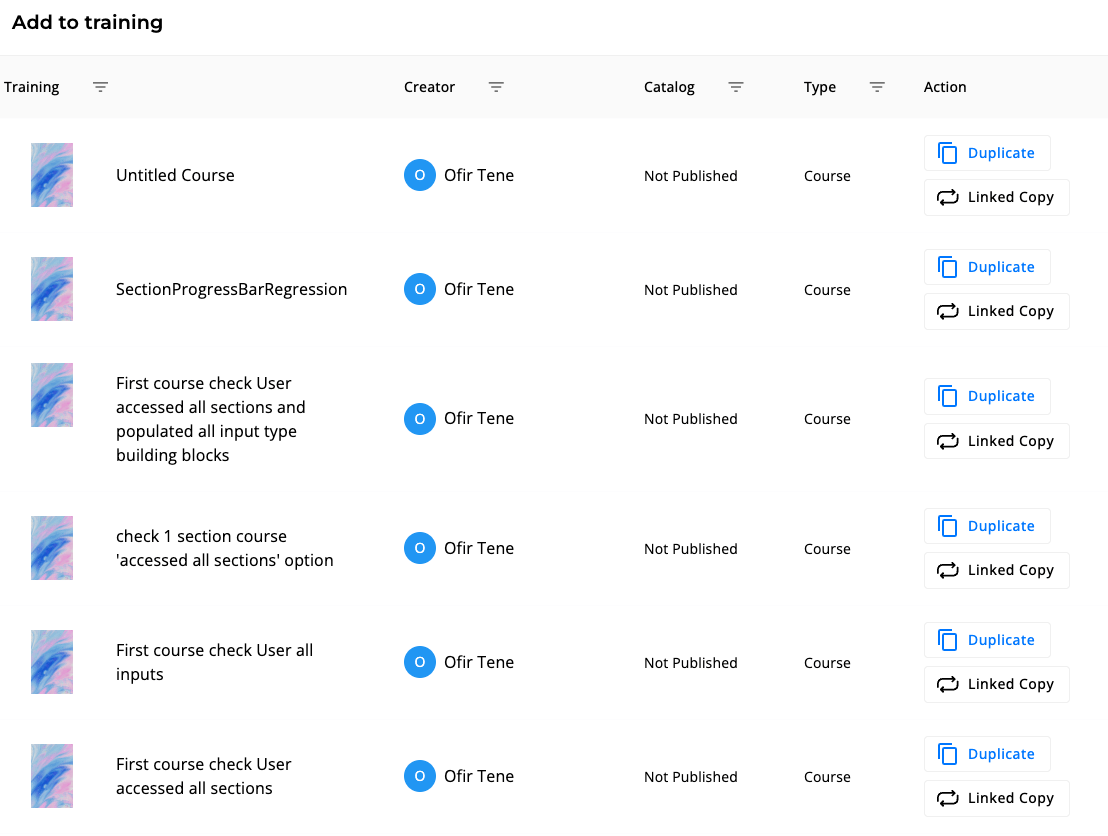 These are **two different actions** with very different governance implications:
| Button | What it creates | Edits propagate? | Analytics shared? |
| --------------------------------------- | --------------------------------- | ----------------------------- | -------------------------------- |
| **Linked Copy** *(also called "Reuse")* | A linked instance of the original | Yes — editing one updates all | Yes — combined across instances |
| **Duplicate** | An independent copy | No — fully isolated | No — separate analytics per copy |
Pick **Linked Copy** when you want a single source of truth (e.g., a shared "Onboarding" course used by several Journeys). Pick **Duplicate** when you want a starting template that can diverge.
***
## Duplicate — independent copy
Use when you want a fresh starting point that won't track back to the original.
**What happens:**
* A new unit is created with the same content as the original
* The new unit has its own `_id`, its own analytics, its own enrollment list
* Editing the duplicate does **not** affect the original
* The original's enrollments, completions, and historical analytics are **not** carried over
**How to:**
1. Open the unit in the content editor (or right-click in **Admin → Content Management**)
2. Click **Duplicate**
3. The duplicate opens — rename, edit, and publish independently
Duplicating a Journey duplicates the Journey container but **not** the underlying steps if those steps are themselves reused units. Reused steps stay linked to their source.
***
## Reuse — linked copy
Use when you want the same content to appear in multiple Journeys, channels, or contexts, with edits propagating everywhere it's used.
**What happens:**
* A reference to the original unit is added to the new location (Journey step, channel, etc.)
* The unit's `_id` is unchanged — it's still the same unit
* Edits to the reused unit are visible everywhere it appears
* Enrollment and analytics aggregate across all reuse locations
**How to:**
1. In the Journey or channel editor, click **Add step** → **Reuse existing**
2. Search for the unit by name
3. Select and confirm — the unit is now linked into this Journey
If you reuse a unit and then someone edits the underlying course, every Journey that reuses it sees the new version on next load. This is intentional — content owners control the canonical version.
***
## When to use which
| You want… | Use |
| ----------------------------------------------------------------------------- | -------------------------------- |
| Same compliance training across all departments, with one team owning updates | **Reuse** |
| A "template" course each team can customize | **Duplicate** |
| To bundle existing courses into a Journey without forking them | **Reuse** (as steps) |
| To replace an outdated version without breaking history | **Duplicate** + archive original |
| To translate a course into another language while keeping the original | **Duplicate** + translate |
***
## Sharing and co-creators
Reuse and Duplicate handle copying. **Sharing** is the third axis — granting others the ability to edit a unit you own.
Open any unit and click the **Share** button to:
* Invite **co-editors** — they can edit the unit alongside you
* Invite **viewers** — read-only access
* Grant per-step roles in a Journey (different co-editors per step)
Share permissions are unit-level, not workspace-level. A co-editor on Course A has no rights on Course B unless explicitly added.
For Journey-specific sharing patterns (assigning step-level co-editors), see [Learning Paths](/learning/learning-paths).
***
## What this means for governance
* **Reuse** centralizes ownership. Good for compliance, brand voice, and content the org wants to keep consistent.
* **Duplicate** decentralizes ownership. Good for teams that want autonomy and don't need updates to follow the original.
* **Share** is orthogonal — both reused and duplicated units can have co-editors.
When deciding, ask: *"If I update this content next quarter, who do I want to see the change?"* If the answer is "everyone using it," reuse. If the answer is "only the team owning their copy," duplicate.
These are **two different actions** with very different governance implications:
| Button | What it creates | Edits propagate? | Analytics shared? |
| --------------------------------------- | --------------------------------- | ----------------------------- | -------------------------------- |
| **Linked Copy** *(also called "Reuse")* | A linked instance of the original | Yes — editing one updates all | Yes — combined across instances |
| **Duplicate** | An independent copy | No — fully isolated | No — separate analytics per copy |
Pick **Linked Copy** when you want a single source of truth (e.g., a shared "Onboarding" course used by several Journeys). Pick **Duplicate** when you want a starting template that can diverge.
***
## Duplicate — independent copy
Use when you want a fresh starting point that won't track back to the original.
**What happens:**
* A new unit is created with the same content as the original
* The new unit has its own `_id`, its own analytics, its own enrollment list
* Editing the duplicate does **not** affect the original
* The original's enrollments, completions, and historical analytics are **not** carried over
**How to:**
1. Open the unit in the content editor (or right-click in **Admin → Content Management**)
2. Click **Duplicate**
3. The duplicate opens — rename, edit, and publish independently
Duplicating a Journey duplicates the Journey container but **not** the underlying steps if those steps are themselves reused units. Reused steps stay linked to their source.
***
## Reuse — linked copy
Use when you want the same content to appear in multiple Journeys, channels, or contexts, with edits propagating everywhere it's used.
**What happens:**
* A reference to the original unit is added to the new location (Journey step, channel, etc.)
* The unit's `_id` is unchanged — it's still the same unit
* Edits to the reused unit are visible everywhere it appears
* Enrollment and analytics aggregate across all reuse locations
**How to:**
1. In the Journey or channel editor, click **Add step** → **Reuse existing**
2. Search for the unit by name
3. Select and confirm — the unit is now linked into this Journey
If you reuse a unit and then someone edits the underlying course, every Journey that reuses it sees the new version on next load. This is intentional — content owners control the canonical version.
***
## When to use which
| You want… | Use |
| ----------------------------------------------------------------------------- | -------------------------------- |
| Same compliance training across all departments, with one team owning updates | **Reuse** |
| A "template" course each team can customize | **Duplicate** |
| To bundle existing courses into a Journey without forking them | **Reuse** (as steps) |
| To replace an outdated version without breaking history | **Duplicate** + archive original |
| To translate a course into another language while keeping the original | **Duplicate** + translate |
***
## Sharing and co-creators
Reuse and Duplicate handle copying. **Sharing** is the third axis — granting others the ability to edit a unit you own.
Open any unit and click the **Share** button to:
* Invite **co-editors** — they can edit the unit alongside you
* Invite **viewers** — read-only access
* Grant per-step roles in a Journey (different co-editors per step)
Share permissions are unit-level, not workspace-level. A co-editor on Course A has no rights on Course B unless explicitly added.
For Journey-specific sharing patterns (assigning step-level co-editors), see [Learning Paths](/learning/learning-paths).
***
## What this means for governance
* **Reuse** centralizes ownership. Good for compliance, brand voice, and content the org wants to keep consistent.
* **Duplicate** decentralizes ownership. Good for teams that want autonomy and don't need updates to follow the original.
* **Share** is orthogonal — both reused and duplicated units can have co-editors.
When deciding, ask: *"If I update this content next quarter, who do I want to see the change?"* If the answer is "everyone using it," reuse. If the answer is "only the team owning their copy," duplicate.