> ## Documentation Index
> Fetch the complete documentation index at: https://docs.junojourney.com/llms.txt
> Use this file to discover all available pages before exploring further.
# Goals
> Set, track, and complete development goals — with action items, skills, mentors, and AI assistance.
export const RelatedPages = ({pages = []}) => {
if (pages.length === 0) return null;
return <>
Related articles
{pages.map(page => )}
;
};
export const VideoWalkthrough = ({src, alt, caption}) => {
return
 ;
};
export const InternalNote = ({children}) => {
const [isInternal, setIsInternal] = useState(false);
useEffect(() => {
const user = window.__mintlify_user__;
if (user?.groups?.includes("internal")) setIsInternal(true);
}, []);
if (!isInternal) return null;
return
;
};
export const InternalNote = ({children}) => {
const [isInternal, setIsInternal] = useState(false);
useEffect(() => {
const user = window.__mintlify_user__;
if (user?.groups?.includes("internal")) setIsInternal(true);
}, []);
if (!isInternal) return null;
return
🔒 Internal Note
{children}
;
};
export const FeatureAvailability = ({module, feature}) => {
const label = feature || module;
return
{label ? <>This feature requires the {label} module. : <>This feature may not be enabled for your organization. }
If you don't see it in Juno, contact your administrator.
;
};
## What is a goal?
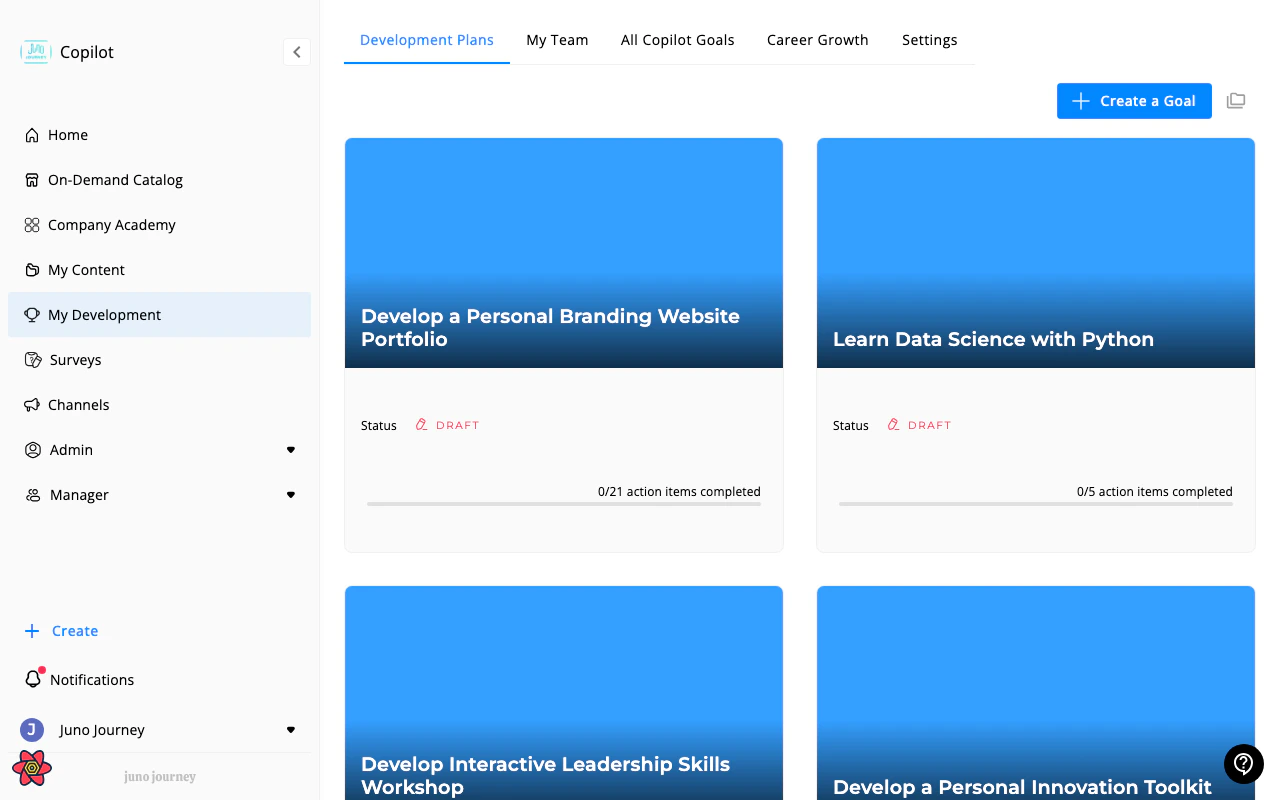
A goal in Juno is a structured development objective with action items, target skills, a timeline, and optional mentor support. Goals help you track professional growth — whether learning a new skill, preparing for a role change, or hitting a business target.
 ***
## Creating a goal
Click **Create Goal** in My Development. You'll walk through a guided flow:
**From scratch** — define your own goal, or **AI-assisted** — let Juno suggest goals based on your role and position.
Add a title, description, focus area, and end date.
Select an AI-generated image or upload your own to personalize the goal card.
Invite an expert or learning buddy to support you. They'll be able to see and comment on your goal.
Commit to the goal to make it active. You can also save it as a draft first.
***
## Creating a goal
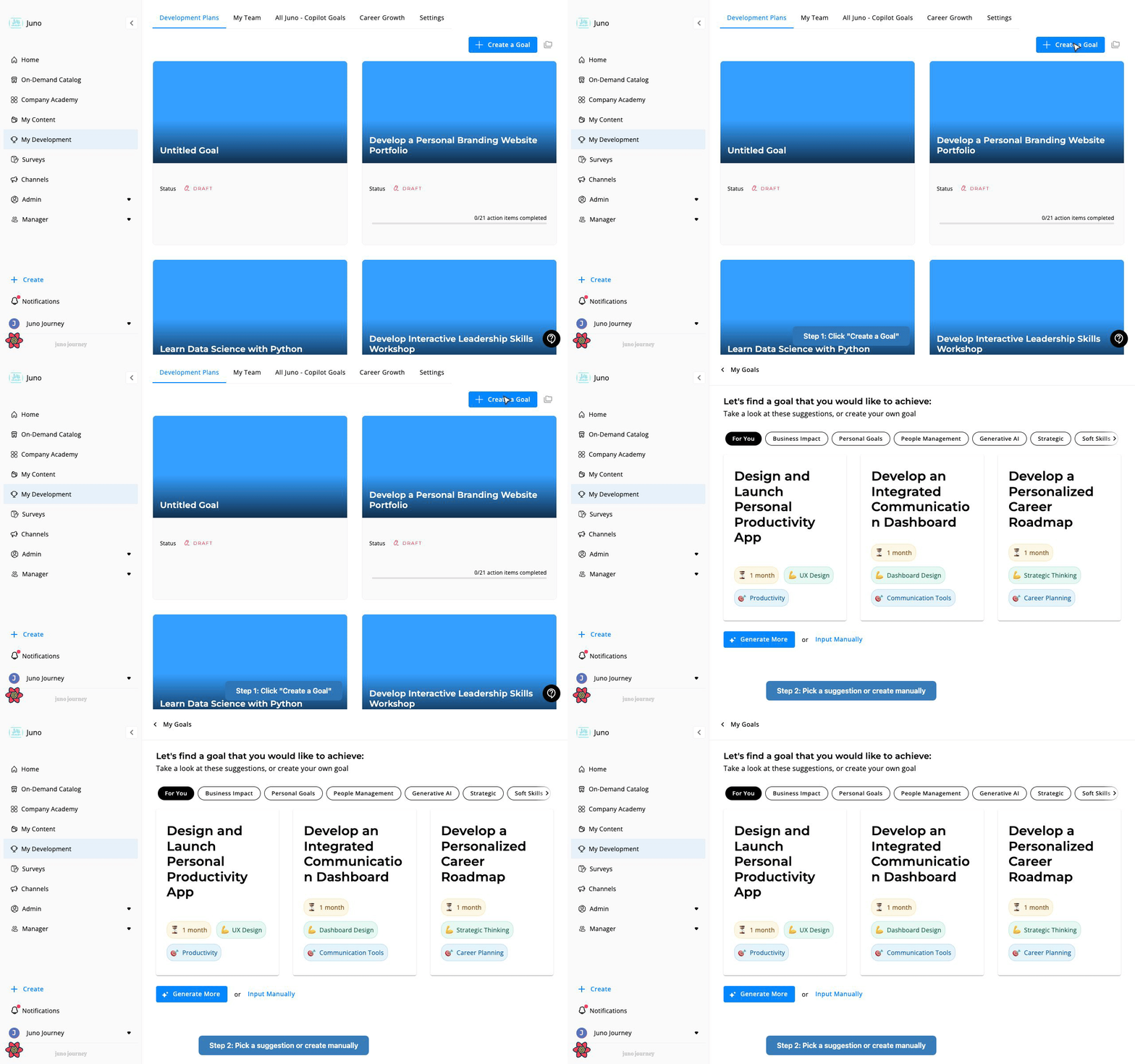
Click **Create Goal** in My Development. You'll walk through a guided flow:
**From scratch** — define your own goal, or **AI-assisted** — let Juno suggest goals based on your role and position.
Add a title, description, focus area, and end date.
Select an AI-generated image or upload your own to personalize the goal card.
Invite an expert or learning buddy to support you. They'll be able to see and comment on your goal.
Commit to the goal to make it active. You can also save it as a draft first.
 ### Focus areas
When creating a goal, select a focus:
| Focus | What it means |
| ---------------- | ----------------------------------------- |
| **Balanced** | General development across multiple areas |
| **Professional** | Career and skill growth |
| **Business** | Business outcomes and targets |
### End date options
You can set a fixed date or select a preset duration: 2 weeks, 4 weeks, 3 months, or 6 months.
***
## Goal lifecycle
| State | What it means |
| ------------- | -------------------------------------------------------------------------- |
| **Draft** | Created but not yet committed — visible only to you |
| **Launched** | You've committed to the goal — it's now active and visible to your manager |
| **Completed** | You've marked the goal as done — completion date recorded |
| **Archived** | Hidden from your main view but still accessible |
***
## Action items
Each goal contains **action items** — the specific tasks you need to complete. Action items fall into three categories:
| Category | Purpose |
| ----------- | ---------------------------------------------- |
| **Learn** | Acquire knowledge — courses, reading, research |
| **Prepare** | Get ready — practice, plan, organize |
| **Execute** | Do the work — deliver, present, build |
Action items can link to:
* **Internal content** — courses from your Company Academy
* **External content** — courses from the On-Demand Catalog
* **External links** — any URL
* **General tasks** — freeform to-do items
Track progress on each action item individually. When all items are complete, the goal is ready to be marked done.
***
## Skills and competencies
Goals can include **skills** and **competencies** you're working to develop. Each skill has a target level (1–5). As you progress, update your skill level to track growth over time.
Skills in your goals connect to your organization's competency framework — see [Competencies & Skills](/development/competencies-and-skills).
***
## Mentors and learning buddies
Goals support two types of support relationships:
**Expert / Mentor:**
* You select a mentor when creating the goal
* The mentor receives a notification and can accept or decline
* Once accepted, they can view your goal, track your progress, and leave notes
* Mentors see all goals they're mentoring in a dedicated **Expert** view
**Learning Buddy:**
* A peer who supports your development
* They can see and collaborate on your goal
***
## Who can see your goals?
| Role | What they see |
| ----------------------- | ---------------------------------------------- |
| **You** | All your own goals (drafts, active, archived) |
| **Your manager** | Your launched and completed goals (not drafts) |
| **Your mentor/expert** | Only the goal(s) they're mentoring |
| **Your learning buddy** | Only the goal(s) they're partnered on |
| **Admins** | All company goals in the admin view |
Goal access logic in `GoalController`: user can access a goal if they are ADMIN+, OR the selected expert, OR the learning partner, OR the goal owner, OR the goal creator, OR the goal owner's manager (or ancestor in org hierarchy). The `listMyTeamGoals` endpoint returns paginated goals for the manager's direct and indirect reports. `listCompanyGoals` is admin-only.
***
## Manager goal management
Managers can:
* **Create goals for team members** — from the My Team view
* **View team progress** — table with columns for title, user, committed status, completed status, mentor, and end date
* **Export team goals** — download as CSV
***
## Notifications
Juno sends notifications for key goal events:
* Manager notified when you create or update a goal
* Manager notified when you complete a goal
* Expert notified when invited to mentor a goal
* You're notified if a manager creates a goal for you
***
## Completing a goal
When you've finished all action items and feel the goal is met, mark it as **Completed**. This:
* Records the completion date
* Notifies your manager
* Moves the goal to your completed list
You can also archive goals you no longer want to pursue.
### Focus areas
When creating a goal, select a focus:
| Focus | What it means |
| ---------------- | ----------------------------------------- |
| **Balanced** | General development across multiple areas |
| **Professional** | Career and skill growth |
| **Business** | Business outcomes and targets |
### End date options
You can set a fixed date or select a preset duration: 2 weeks, 4 weeks, 3 months, or 6 months.
***
## Goal lifecycle
| State | What it means |
| ------------- | -------------------------------------------------------------------------- |
| **Draft** | Created but not yet committed — visible only to you |
| **Launched** | You've committed to the goal — it's now active and visible to your manager |
| **Completed** | You've marked the goal as done — completion date recorded |
| **Archived** | Hidden from your main view but still accessible |
***
## Action items
Each goal contains **action items** — the specific tasks you need to complete. Action items fall into three categories:
| Category | Purpose |
| ----------- | ---------------------------------------------- |
| **Learn** | Acquire knowledge — courses, reading, research |
| **Prepare** | Get ready — practice, plan, organize |
| **Execute** | Do the work — deliver, present, build |
Action items can link to:
* **Internal content** — courses from your Company Academy
* **External content** — courses from the On-Demand Catalog
* **External links** — any URL
* **General tasks** — freeform to-do items
Track progress on each action item individually. When all items are complete, the goal is ready to be marked done.
***
## Skills and competencies
Goals can include **skills** and **competencies** you're working to develop. Each skill has a target level (1–5). As you progress, update your skill level to track growth over time.
Skills in your goals connect to your organization's competency framework — see [Competencies & Skills](/development/competencies-and-skills).
***
## Mentors and learning buddies
Goals support two types of support relationships:
**Expert / Mentor:**
* You select a mentor when creating the goal
* The mentor receives a notification and can accept or decline
* Once accepted, they can view your goal, track your progress, and leave notes
* Mentors see all goals they're mentoring in a dedicated **Expert** view
**Learning Buddy:**
* A peer who supports your development
* They can see and collaborate on your goal
***
## Who can see your goals?
| Role | What they see |
| ----------------------- | ---------------------------------------------- |
| **You** | All your own goals (drafts, active, archived) |
| **Your manager** | Your launched and completed goals (not drafts) |
| **Your mentor/expert** | Only the goal(s) they're mentoring |
| **Your learning buddy** | Only the goal(s) they're partnered on |
| **Admins** | All company goals in the admin view |
Goal access logic in `GoalController`: user can access a goal if they are ADMIN+, OR the selected expert, OR the learning partner, OR the goal owner, OR the goal creator, OR the goal owner's manager (or ancestor in org hierarchy). The `listMyTeamGoals` endpoint returns paginated goals for the manager's direct and indirect reports. `listCompanyGoals` is admin-only.
***
## Manager goal management
Managers can:
* **Create goals for team members** — from the My Team view
* **View team progress** — table with columns for title, user, committed status, completed status, mentor, and end date
* **Export team goals** — download as CSV
***
## Notifications
Juno sends notifications for key goal events:
* Manager notified when you create or update a goal
* Manager notified when you complete a goal
* Expert notified when invited to mentor a goal
* You're notified if a manager creates a goal for you
***
## Completing a goal
When you've finished all action items and feel the goal is met, mark it as **Completed**. This:
* Records the completion date
* Notifies your manager
* Moves the goal to your completed list
You can also archive goals you no longer want to pursue.