> ## Documentation Index
> Fetch the complete documentation index at: https://docs.junojourney.com/llms.txt
> Use this file to discover all available pages before exploring further.
# Navigating Juno
> A guide to the Juno interface — the home dashboard, suggestion cards, Juno assistant, and sidebar navigation.
export const RelatedPages = ({pages = []}) => {
if (pages.length === 0) return null;
return <>
Related articles
{pages.map(page => )}
;
};
## The home dashboard
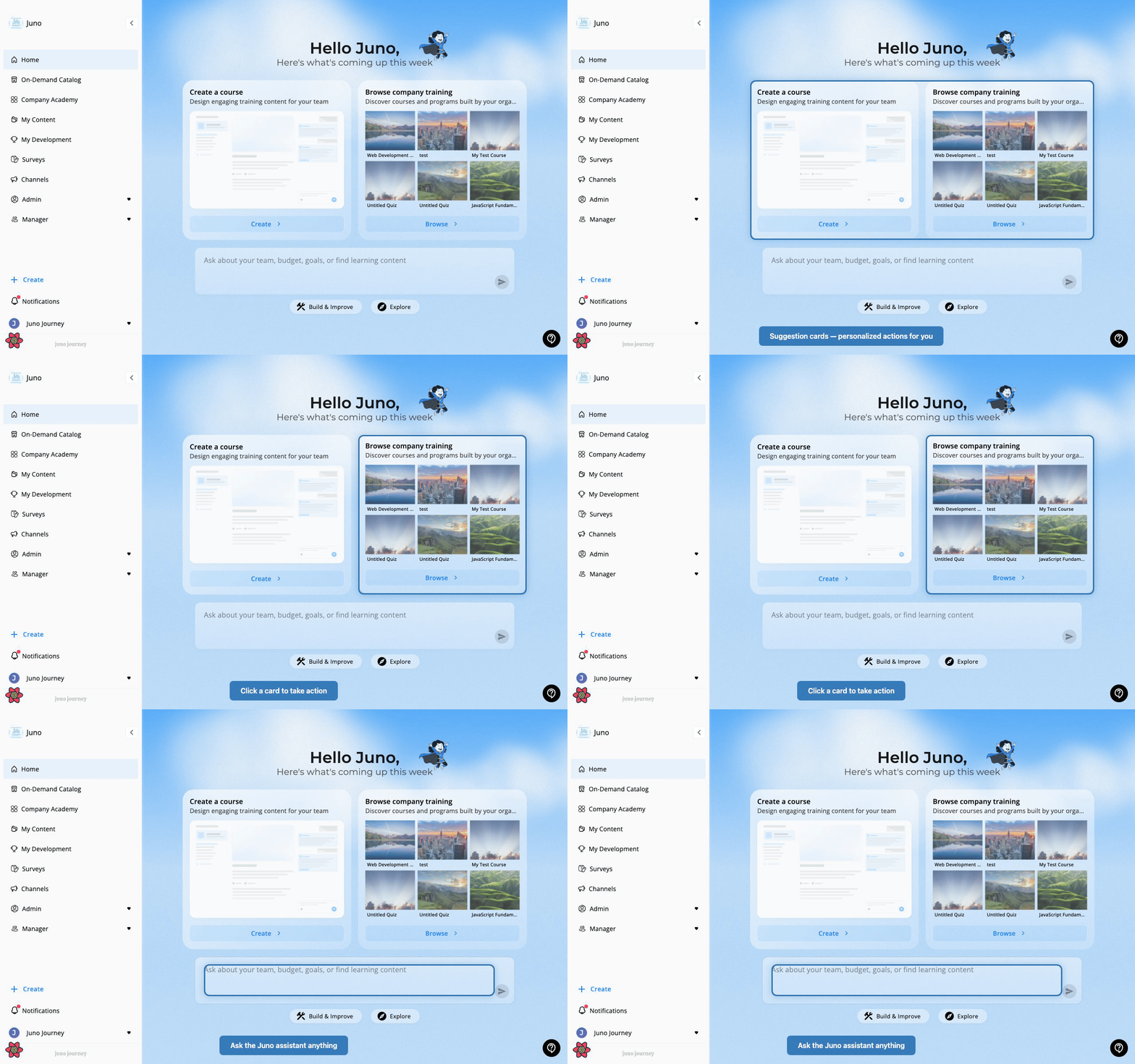
When you log in, you land on your **Home** page. Juno's home is designed around an AI-first experience: an assistant you can talk to, and smart suggestion cards that surface what needs your attention. It consolidates progress, upcoming tasks, and career opportunities into a single page.
 ### What's on home
| Section | Purpose |
| --------------------- | ------------------------------------------------------------------------------------------------------------------------------- |
| **Welcome card** | Personalized greeting that surfaces the learning content you most recently engaged with |
| **Progress overview** | Snapshot of your achievements and remaining items in your development plan — completed tasks, mastered skills, last-update date |
| **What's Next** | Prioritized list of next actions, sorted by nearest due date — keeps you focused on imminent work |
| **Assignments** | Items assigned to you (replaces the older "My Assignments" tab), sorted by due date |
| **Opportunities** | Open job openings within your organization with a match score against your profile and potential salary uplift |
| **Suggestion cards** | AI- and rule-driven cards (see below) |
| **Juno assistant** | Conversational AI input at the bottom of the page |
***
## Suggestion cards
The center of the home page shows a grid of **suggestion cards** — actions and recommendations surfaced for you specifically.
Cards come from two sources:
**Preset cards** — always available based on your modules:
| Card | What it does |
| ----------------------------- | -------------------------------------------- |
| **Browse company training** | Open the Company Academy catalog |
| **Explore external learning** | Open the On-Demand Catalog |
| **Create a course** | Start creating new learning content (admins) |
| **Check your goals** | View your development goals |
| **Upcoming events** | See your event calendar |
**Smart action cards** — generated by Juno based on your activity:
* An assignment with an upcoming due date
* A pending budget request waiting for approval
* A goal that hasn't been updated recently
* A waitlist spot that opened
* An unused voucher
You can **dismiss** or **snooze** any card — Juno will resurface it later if still relevant.
***
## Juno assistant
At the bottom of the home page is the **Juno assistant** — an AI you can talk to in natural language.
**What you can ask:**
> *"Ask about your team, budget, goals, or find learning content"*
Use the **category pills** (Build & Improve, Explore) to browse suggested prompts, or type freely. Examples:
* "What courses are assigned to me this month?"
* "Show me my team's learning progress"
* "Find a course on project management"
* "What's my current learning budget?"
The Juno assistant routes your question to the right part of the platform and responds inline.
The Juno assistant must be enabled by your administrator. If you don't see the chat input on your home page, contact your admin.
***
## The sidebar
The left sidebar is your main navigation. What appears depends on your role and which modules your organization has activated.
| Item | Route | When it appears |
| --------------------- | ------------------------- | ---------------------------- |
| **Home** | `/career` | Most organizations |
| **On-Demand Catalog** | `/catalog` | LXP module active |
| **Company Academy** | `/company-catalog` | LMS module active |
| **My Content** | `/create-and-collaborate` | Content creators |
| **My Development** | `/develop` | Development features enabled |
| **Surveys** | `/surveys` | Surveys enabled |
| **Channels** | `/channels` | Channels enabled |
| **Admin** | `/admin/0` | Admin role |
| **Manager** | `/managers/3` | Manager role |
At the bottom of the sidebar you'll find:
* **+ Create** — quick-create menu for new content
* **Notifications** — bell icon for assignments, feedback, events
* **Your profile** — click your avatar to view profile and settings
***
## Notifications
Click the **bell icon** in the sidebar to see new assignments, feedback requests, event reminders, and system messages. Click any notification to go directly to the relevant item.
See [Notifications](/getting-started/notifications) for details on notification channels and preferences.
### What's on home
| Section | Purpose |
| --------------------- | ------------------------------------------------------------------------------------------------------------------------------- |
| **Welcome card** | Personalized greeting that surfaces the learning content you most recently engaged with |
| **Progress overview** | Snapshot of your achievements and remaining items in your development plan — completed tasks, mastered skills, last-update date |
| **What's Next** | Prioritized list of next actions, sorted by nearest due date — keeps you focused on imminent work |
| **Assignments** | Items assigned to you (replaces the older "My Assignments" tab), sorted by due date |
| **Opportunities** | Open job openings within your organization with a match score against your profile and potential salary uplift |
| **Suggestion cards** | AI- and rule-driven cards (see below) |
| **Juno assistant** | Conversational AI input at the bottom of the page |
***
## Suggestion cards
The center of the home page shows a grid of **suggestion cards** — actions and recommendations surfaced for you specifically.
Cards come from two sources:
**Preset cards** — always available based on your modules:
| Card | What it does |
| ----------------------------- | -------------------------------------------- |
| **Browse company training** | Open the Company Academy catalog |
| **Explore external learning** | Open the On-Demand Catalog |
| **Create a course** | Start creating new learning content (admins) |
| **Check your goals** | View your development goals |
| **Upcoming events** | See your event calendar |
**Smart action cards** — generated by Juno based on your activity:
* An assignment with an upcoming due date
* A pending budget request waiting for approval
* A goal that hasn't been updated recently
* A waitlist spot that opened
* An unused voucher
You can **dismiss** or **snooze** any card — Juno will resurface it later if still relevant.
***
## Juno assistant
At the bottom of the home page is the **Juno assistant** — an AI you can talk to in natural language.
**What you can ask:**
> *"Ask about your team, budget, goals, or find learning content"*
Use the **category pills** (Build & Improve, Explore) to browse suggested prompts, or type freely. Examples:
* "What courses are assigned to me this month?"
* "Show me my team's learning progress"
* "Find a course on project management"
* "What's my current learning budget?"
The Juno assistant routes your question to the right part of the platform and responds inline.
The Juno assistant must be enabled by your administrator. If you don't see the chat input on your home page, contact your admin.
***
## The sidebar
The left sidebar is your main navigation. What appears depends on your role and which modules your organization has activated.
| Item | Route | When it appears |
| --------------------- | ------------------------- | ---------------------------- |
| **Home** | `/career` | Most organizations |
| **On-Demand Catalog** | `/catalog` | LXP module active |
| **Company Academy** | `/company-catalog` | LMS module active |
| **My Content** | `/create-and-collaborate` | Content creators |
| **My Development** | `/develop` | Development features enabled |
| **Surveys** | `/surveys` | Surveys enabled |
| **Channels** | `/channels` | Channels enabled |
| **Admin** | `/admin/0` | Admin role |
| **Manager** | `/managers/3` | Manager role |
At the bottom of the sidebar you'll find:
* **+ Create** — quick-create menu for new content
* **Notifications** — bell icon for assignments, feedback, events
* **Your profile** — click your avatar to view profile and settings
***
## Notifications
Click the **bell icon** in the sidebar to see new assignments, feedback requests, event reminders, and system messages. Click any notification to go directly to the relevant item.
See [Notifications](/getting-started/notifications) for details on notification channels and preferences.