> ## Documentation Index
> Fetch the complete documentation index at: https://docs.junojourney.com/llms.txt
> Use this file to discover all available pages before exploring further.
# Provision customers from Salesforce
> Automatically create Juno learners from Salesforce Contacts and keep them in sync.
export const RelatedPages = ({pages = []}) => {
if (pages.length === 0) return null;
return <>
Related articles
{pages.map(page => )}
;
};
export const RoleBadge = ({roles = []}) => {
const colorMap = {
Admin: "yellow",
Manager: "blue",
Learner: "green",
"Co-editor": "purple"
};
return <>
{roles.map(role => {role}{" "})}
;
};
export const Prerequisites = ({items = []}) => {
return
{items.length > 0 &&
{items.map((item, index) => - {item}
)}
}
;
};
Customer provisioning turns Salesforce Contacts into Juno learners automatically. You define which Contacts qualify, Juno creates learner accounts for them, keeps names and emails in sync as Contacts change, and deactivates learners whose Contacts stop matching. Their learning activity then [syncs back to Salesforce](/integrations/salesforce-activity-sync) on the same records your team reports on.
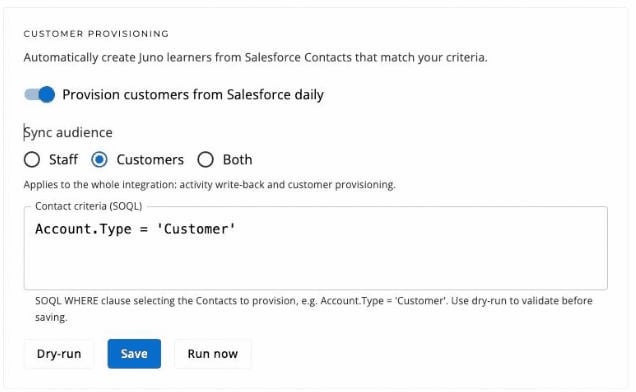 ## Choose who gets access
Go to **Admin** > **Integrations** > **Salesforce**. The **Customer provisioning** card sits under the connection card.
The criteria is a Salesforce WHERE clause selecting the Contacts to provision — for example `Account.Type = 'Customer'`. It runs against your own org with your own fields, so anything your Salesforce reports can filter on works here.
Not sure what you can filter on? Select **Show available fields** to list the Contact fields in your org, custom ones included, with their API names. Selecting a field adds it to the criteria. Juno reads only the field *names* here — no Contact data is fetched until you dry-run.
Select **Dry-run** to preview exactly what would happen — how many Contacts match, who gets created, updated, or deactivated, and any email changes — without changing anything. Dry-run works on unsaved criteria, so iterate until the numbers look right.
Turn on **Provision customers from Salesforce daily** and select **Save**. Juno syncs nightly from then on. **Run now** applies the saved criteria immediately — it asks for confirmation first, because matching Contacts become learners and previously provisioned learners who no longer match are deactivated.
Start narrow. A criteria like `Account.Type = 'Customer' AND Title LIKE '%admin%'` provisions a pilot group first; widen it when you're happy with the flow.
## Choose the sync audience
**Sync audience** — **Staff**, **Customers**, or **Both** — applies to the whole integration: it controls whose activity writes back to Salesforce as well as customer provisioning. Staff are your employees; customers are the learners this page creates.
## What a sync run does
| Change in Salesforce | What Juno does |
| ---------------------------------------- | -------------------------------------------------------- |
| Contact newly matches your criteria | Creates a learner account (no email is sent at creation) |
| Matching Contact's name or email changes | Updates the learner in place — same account, new details |
| Contact stops matching, or is deleted | Deactivates the learner Juno created |
| A Contact matches an existing Juno user | Links to that user without changing their role or access |
Deactivation has four guardrails:
* **Zero matches deactivate nobody.** A criteria typo that matches no Contacts never locks everyone out.
* **A large batch is refused wholesale.** A run that would deactivate more than a tenth of your provisioned learners (or 5, whichever is higher) is skipped entirely rather than applied piecemeal — that pattern is far more often a bad criteria than genuine churn.
* **A partial read deactivates nobody.** If the Contact read hits its record cap, that run skips deactivation — absence can't be trusted when the list is incomplete.
* **Only plain learners are auto-deactivated.** Anyone provisioning promoted above Learner is left alone and logged; deactivate them manually if that's what you want.
## How provisioned customers sign in
Provisioned learners sign in with a magic link — no password to set, nothing to install:
1. They open your organization's Juno sign-in page and enter their email address (the one on their Contact).
2. Juno emails them a sign-in link, valid for one hour.
3. Selecting the link signs them in as a learner — they see what's assigned to them, browse what you've shared, and their activity syncs back to your org.
Deactivated learners can't request new sign-in links, and links they already received stop working.
## Choose who gets access
Go to **Admin** > **Integrations** > **Salesforce**. The **Customer provisioning** card sits under the connection card.
The criteria is a Salesforce WHERE clause selecting the Contacts to provision — for example `Account.Type = 'Customer'`. It runs against your own org with your own fields, so anything your Salesforce reports can filter on works here.
Not sure what you can filter on? Select **Show available fields** to list the Contact fields in your org, custom ones included, with their API names. Selecting a field adds it to the criteria. Juno reads only the field *names* here — no Contact data is fetched until you dry-run.
Select **Dry-run** to preview exactly what would happen — how many Contacts match, who gets created, updated, or deactivated, and any email changes — without changing anything. Dry-run works on unsaved criteria, so iterate until the numbers look right.
Turn on **Provision customers from Salesforce daily** and select **Save**. Juno syncs nightly from then on. **Run now** applies the saved criteria immediately — it asks for confirmation first, because matching Contacts become learners and previously provisioned learners who no longer match are deactivated.
Start narrow. A criteria like `Account.Type = 'Customer' AND Title LIKE '%admin%'` provisions a pilot group first; widen it when you're happy with the flow.
## Choose the sync audience
**Sync audience** — **Staff**, **Customers**, or **Both** — applies to the whole integration: it controls whose activity writes back to Salesforce as well as customer provisioning. Staff are your employees; customers are the learners this page creates.
## What a sync run does
| Change in Salesforce | What Juno does |
| ---------------------------------------- | -------------------------------------------------------- |
| Contact newly matches your criteria | Creates a learner account (no email is sent at creation) |
| Matching Contact's name or email changes | Updates the learner in place — same account, new details |
| Contact stops matching, or is deleted | Deactivates the learner Juno created |
| A Contact matches an existing Juno user | Links to that user without changing their role or access |
Deactivation has four guardrails:
* **Zero matches deactivate nobody.** A criteria typo that matches no Contacts never locks everyone out.
* **A large batch is refused wholesale.** A run that would deactivate more than a tenth of your provisioned learners (or 5, whichever is higher) is skipped entirely rather than applied piecemeal — that pattern is far more often a bad criteria than genuine churn.
* **A partial read deactivates nobody.** If the Contact read hits its record cap, that run skips deactivation — absence can't be trusted when the list is incomplete.
* **Only plain learners are auto-deactivated.** Anyone provisioning promoted above Learner is left alone and logged; deactivate them manually if that's what you want.
## How provisioned customers sign in
Provisioned learners sign in with a magic link — no password to set, nothing to install:
1. They open your organization's Juno sign-in page and enter their email address (the one on their Contact).
2. Juno emails them a sign-in link, valid for one hour.
3. Selecting the link signs them in as a learner — they see what's assigned to them, browse what you've shared, and their activity syncs back to your org.
Deactivated learners can't request new sign-in links, and links they already received stop working.