> ## Documentation Index
> Fetch the complete documentation index at: https://docs.junojourney.com/llms.txt
> Use this file to discover all available pages before exploring further.
# Catalogs & Marketplace
> Finding and enrolling in learning — your organization's internal catalog and the external on-demand marketplace.
export const RelatedPages = ({pages = []}) => {
if (pages.length === 0) return null;
return <>
Related articles
{pages.map(page => )}
;
};
export const FeatureAvailability = ({module, feature}) => {
const label = feature || module;
return
{label ? <>This feature requires the {label} module. : <>This feature may not be enabled for your organization. }
If you don't see it in Juno, contact your administrator.
;
};
## Two catalogs
Juno has two places to find learning content, depending on what your organization has activated:
| Catalog | Sidebar name | Route | Module |
| --------------------- | ----------------- | ------------------ | ------ |
| **Company Academy** | Company Academy | `/company-catalog` | LMS |
| **On-Demand Catalog** | On-Demand Catalog | `/catalog` | LXP |
Both may be available, or just one, depending on your organization's setup.
***
## On-Demand Catalog
Access external content from integrated providers across video courses, books, and live workshops.
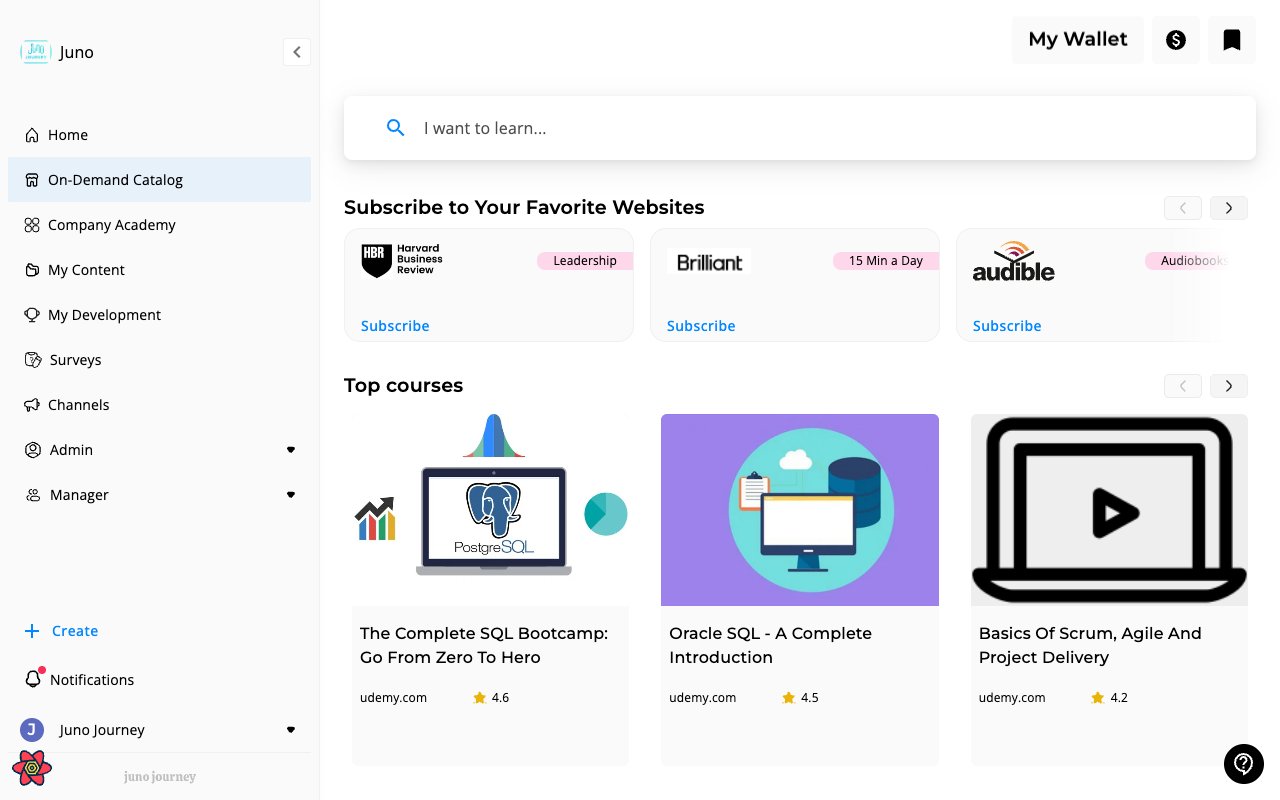 **What you'll find:**
* **Provider subscriptions** — subscribe to your favorite learning websites
* **Top courses** — curated external courses with ratings and provider info
* **Search** — "I want to learn..." search bar to find specific topics
**My Wallet** — click the wallet icon (top right) to check your learning budget balance.
### Supported providers
Juno surfaces content from a wide range of third-party learning sources — e-learning platforms, articles, books, podcasts, and tools & certifications.
See the full list at **[External Learning Sources](/learning/external-providers)**.
Provider availability depends on your organization's subscriptions. Admins enable providers in **Admin → Content & Learning → External Content Management**.
### Requesting content
Some content requires a request before you can access it — this happens when:
* The content has a cost (uses your learning budget)
* Your organization requires manager approval for external learning
When you click **Request**, your manager receives a notification to approve or deny. Once approved, the content appears in your library.
**Free content:** Content with no cost and no approval requirement enrolls immediately.
For payment workflows after a request is approved (vouchers, reimbursements), see [Budget & Credits → Vouchers and purchases](/admin/budget-and-credits#vouchers-and-purchases).
***
## Company Academy
Your organization's internal content library. Admins and content creators publish courses, Journeys, quizzes, and other learning here.
**What you'll find:**
* **Provider subscriptions** — subscribe to your favorite learning websites
* **Top courses** — curated external courses with ratings and provider info
* **Search** — "I want to learn..." search bar to find specific topics
**My Wallet** — click the wallet icon (top right) to check your learning budget balance.
### Supported providers
Juno surfaces content from a wide range of third-party learning sources — e-learning platforms, articles, books, podcasts, and tools & certifications.
See the full list at **[External Learning Sources](/learning/external-providers)**.
Provider availability depends on your organization's subscriptions. Admins enable providers in **Admin → Content & Learning → External Content Management**.
### Requesting content
Some content requires a request before you can access it — this happens when:
* The content has a cost (uses your learning budget)
* Your organization requires manager approval for external learning
When you click **Request**, your manager receives a notification to approve or deny. Once approved, the content appears in your library.
**Free content:** Content with no cost and no approval requirement enrolls immediately.
For payment workflows after a request is approved (vouchers, reimbursements), see [Budget & Credits → Vouchers and purchases](/admin/budget-and-credits#vouchers-and-purchases).
***
## Company Academy
Your organization's internal content library. Admins and content creators publish courses, Journeys, quizzes, and other learning here.
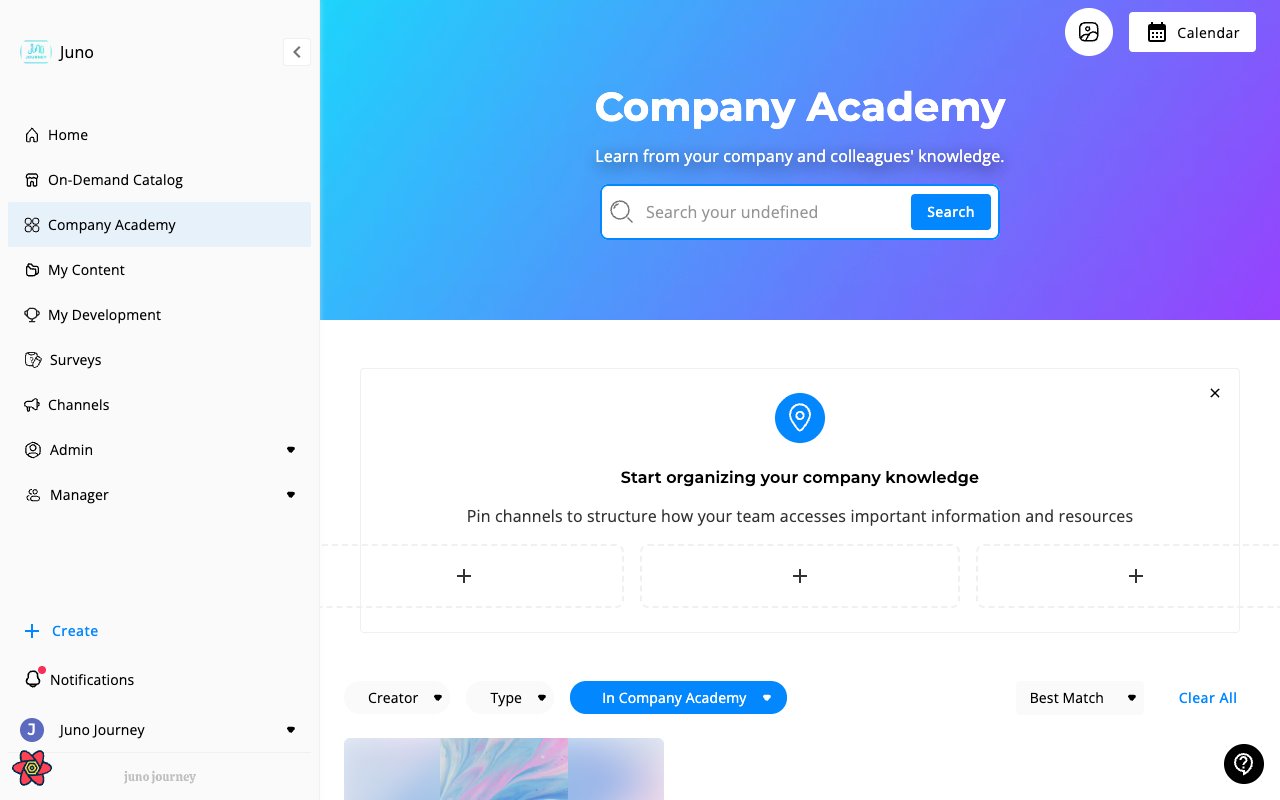 **Browsing:**
* **Search** — search published content by title or keyword
* **Channels** — content organized into channels by your admin
* **Filters** — filter by Creator, Type, and sort by Best Match
**Enrolling:** Click a learning item and select **Enroll** or **Start**. Enrollment is immediate for most LMS content.
***
## Search
Each catalog has its own search bar. The On-Demand Catalog searches across external providers, while the Company Academy searches your organization's published content.
**Browsing:**
* **Search** — search published content by title or keyword
* **Channels** — content organized into channels by your admin
* **Filters** — filter by Creator, Type, and sort by Best Match
**Enrolling:** Click a learning item and select **Enroll** or **Start**. Enrollment is immediate for most LMS content.
***
## Search
Each catalog has its own search bar. The On-Demand Catalog searches across external providers, while the Company Academy searches your organization's published content.