> ## Documentation Index
> Fetch the complete documentation index at: https://docs.junojourney.com/llms.txt
> Use this file to discover all available pages before exploring further.
# Journey co-editors
> Choose which Journey steps each co-editor can edit, and give them linked copies one by one.
export const VideoWalkthrough = ({src, alt, caption}) => {
return
 ;
};
export const RelatedPages = ({pages = []}) => {
if (pages.length === 0) return null;
return <>
;
};
export const RelatedPages = ({pages = []}) => {
if (pages.length === 0) return null;
return <>
Related articles
{pages.map(page => )}
;
};
export const RoleBadge = ({roles = []}) => {
const colorMap = {
Admin: "yellow",
Manager: "blue",
Learner: "green",
"Co-editor": "purple"
};
return <>
{roles.map(role => {role}{" "})}
;
};
export const FeatureAvailability = ({module, feature}) => {
const label = feature || module;
return
{label ? <>This feature requires the {label} module. : <>This feature may not be enabled for your organization. }
If you don't see it in Juno, contact your administrator.
;
};
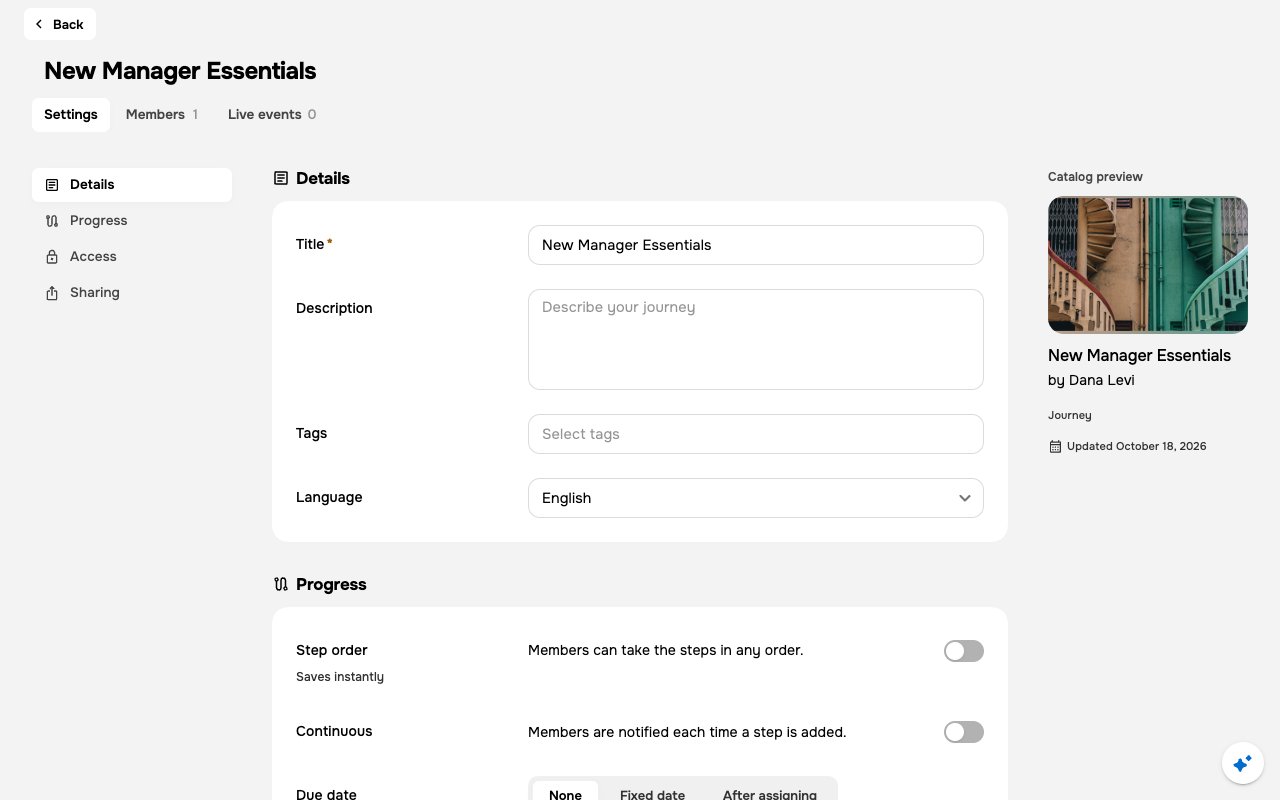
Co-editors help you build a Journey. For each co-editor, you choose which of the Journey's own steps they can edit: all of them, or only the ones you pick. Linked copies in the Journey keep their own co-editors. If you can edit one, you can make the person its co-editor from the same dialog.
***
## Who can manage co-editors
| You are | What you can do |
| - | - |
| **Journey owner** (the person who created it) | Add and remove co-editors and choose their steps. You always edit the Journey's own steps. |
| **Admin** or **Content** area admin | Add and remove co-editors and choose their steps |
| Co-editor with **All journey steps** | Add and remove co-editors and choose their steps |
| Co-editor with **Selected journey steps** | See who edits the Journey, without changing it (see [What a limited co-editor can do](#what-a-limited-co-editor-can-do)) |
Every co-editor can edit the Journey's structure and settings. Step access only decides which steps they can edit too.
***
## Add a co-editor
Open the Journey's **Manage** view, go to **Settings**, and select **Access** in the left index.
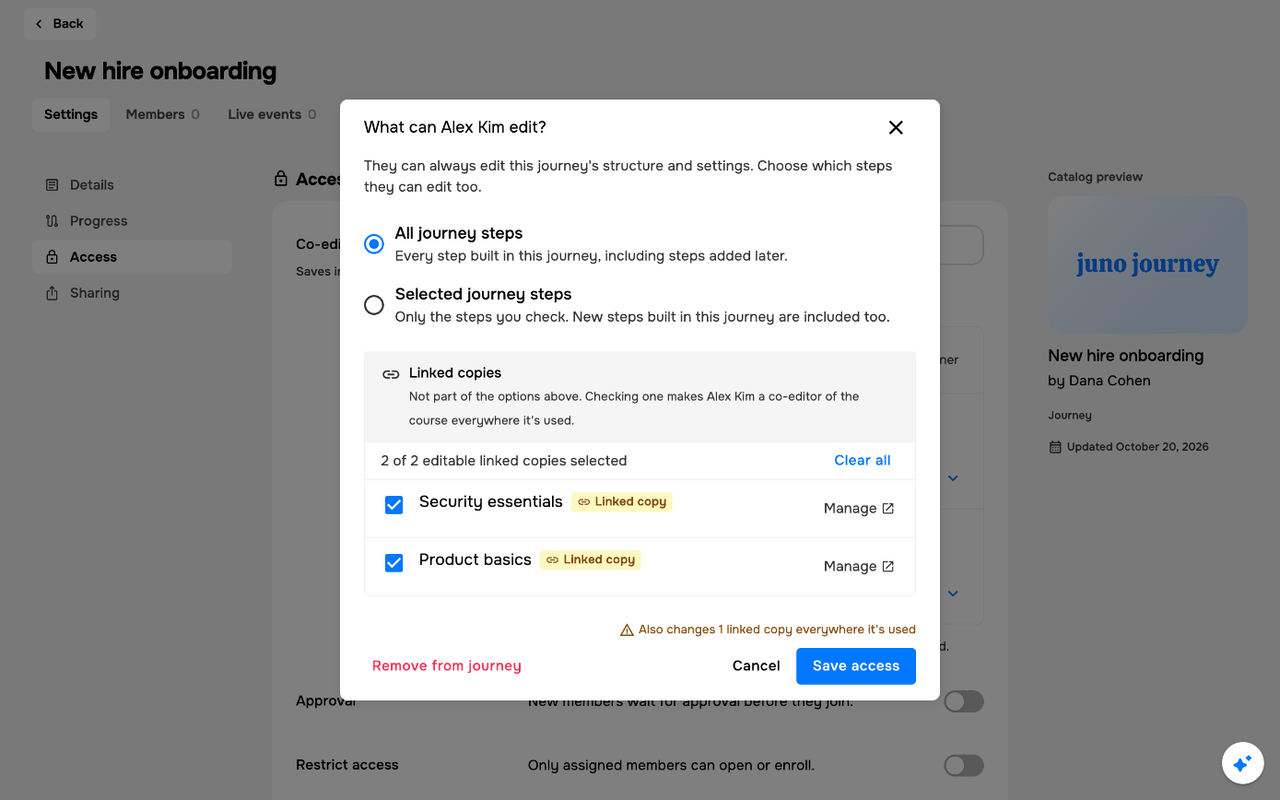
Under **Co-editors**, add the person. Juno saves them right away and opens **What can *name* edit?**.
Choose **All journey steps** or **Selected journey steps**. For **Selected journey steps**, check the steps they can edit.
If the Journey has [linked copies](#linked-copies), check the ones they should co-edit.
Select **Save access**.
 If you close the dialog without saving, the person stays a co-editor with **All journey steps**.
### Step access options
| Option | What the co-editor can edit |
| - | - |
| **All journey steps** | Every step built in the Journey, including steps added later |
| **Selected journey steps** | Only the steps you check. New steps built in the Journey later are included too. |
With **Selected journey steps**, only steps added in the Journey editor are included automatically. A step added another way, such as through the [Juno MCP server](/mcp/overview) or the API, isn't: open **What can *name* edit?** and check it.
Both options cover only the Journey's own steps, the ones built in it. Linked copies aren't part of them.
With **Selected journey steps**, a checklist shows each step built in the Journey and how many you checked, such as **2 of 5 journey steps selected**. **Select all** checks every step; once all are checked, it changes to **Clear all**. If you check no steps, the co-editor can edit only the Journey's structure and settings.
Either way, co-editors can always edit the Journey's structure and settings.
***
## Linked copies
A linked copy is a course added to the Journey from the library with **Reuse** › **Linked Copy** (quizzes and other units can be linked the same way). It's linked to the original course, not copied, so co-editor access is granted on the course itself and applies everywhere it's used (see [Reuse vs Duplicate](/admin/reuse-and-duplicate)). **All journey steps** and **Selected journey steps** don't include it.
In **What can *name* edit?**, linked copies appear in their own **Linked copies** section, each with a **Linked copy** badge. What you see on each course depends on whether you can edit it:
| If you… | You see |
| - | - |
| Can edit the course (you created it, co-edit it, or you're an admin or **Content** area admin) | A checkbox and a **Manage** link. When other Journeys use the course too, **Also in N other journeys**. |
| Can't edit the course | A lock and **Owned by *name*. Only its editors can add co-editors.** |
Checking a course makes the person a co-editor of the course itself, everywhere it's used, not only in this Journey. Unchecking it removes them from the course everywhere.
When you can edit two or more of the courses, **Select all** checks all of them and **Clear all** unchecks them. A count shows how many you checked, such as **2 of 3 editable linked copies selected**. Courses you can't edit aren't counted.
When you change any linked copies, a note next to **Save access** sums them up, such as **Also changes 2 linked copies everywhere they're used**.
**Manage** opens the course's **Settings** › **Access** in a new tab, where you can see and change all of its co-editors. See [Courses](/learning/courses#access).
### If some linked copies don't save
Juno saves the Journey's steps first, then each linked copy on its own. If some fail, the dialog stays open with **Journey steps saved. Couldn't update N linked copies. Try again.** Select **Save access** again to retry. Juno sends only the linked copies that failed.
If you close the dialog without saving, the person stays a co-editor with **All journey steps**.
### Step access options
| Option | What the co-editor can edit |
| - | - |
| **All journey steps** | Every step built in the Journey, including steps added later |
| **Selected journey steps** | Only the steps you check. New steps built in the Journey later are included too. |
With **Selected journey steps**, only steps added in the Journey editor are included automatically. A step added another way, such as through the [Juno MCP server](/mcp/overview) or the API, isn't: open **What can *name* edit?** and check it.
Both options cover only the Journey's own steps, the ones built in it. Linked copies aren't part of them.
With **Selected journey steps**, a checklist shows each step built in the Journey and how many you checked, such as **2 of 5 journey steps selected**. **Select all** checks every step; once all are checked, it changes to **Clear all**. If you check no steps, the co-editor can edit only the Journey's structure and settings.
Either way, co-editors can always edit the Journey's structure and settings.
***
## Linked copies
A linked copy is a course added to the Journey from the library with **Reuse** › **Linked Copy** (quizzes and other units can be linked the same way). It's linked to the original course, not copied, so co-editor access is granted on the course itself and applies everywhere it's used (see [Reuse vs Duplicate](/admin/reuse-and-duplicate)). **All journey steps** and **Selected journey steps** don't include it.
In **What can *name* edit?**, linked copies appear in their own **Linked copies** section, each with a **Linked copy** badge. What you see on each course depends on whether you can edit it:
| If you… | You see |
| - | - |
| Can edit the course (you created it, co-edit it, or you're an admin or **Content** area admin) | A checkbox and a **Manage** link. When other Journeys use the course too, **Also in N other journeys**. |
| Can't edit the course | A lock and **Owned by *name*. Only its editors can add co-editors.** |
Checking a course makes the person a co-editor of the course itself, everywhere it's used, not only in this Journey. Unchecking it removes them from the course everywhere.
When you can edit two or more of the courses, **Select all** checks all of them and **Clear all** unchecks them. A count shows how many you checked, such as **2 of 3 editable linked copies selected**. Courses you can't edit aren't counted.
When you change any linked copies, a note next to **Save access** sums them up, such as **Also changes 2 linked copies everywhere they're used**.
**Manage** opens the course's **Settings** › **Access** in a new tab, where you can see and change all of its co-editors. See [Courses](/learning/courses#access).
### If some linked copies don't save
Juno saves the Journey's steps first, then each linked copy on its own. If some fail, the dialog stays open with **Journey steps saved. Couldn't update N linked copies. Try again.** Select **Save access** again to retry. Juno sends only the linked copies that failed.
 ***
## The co-editor list
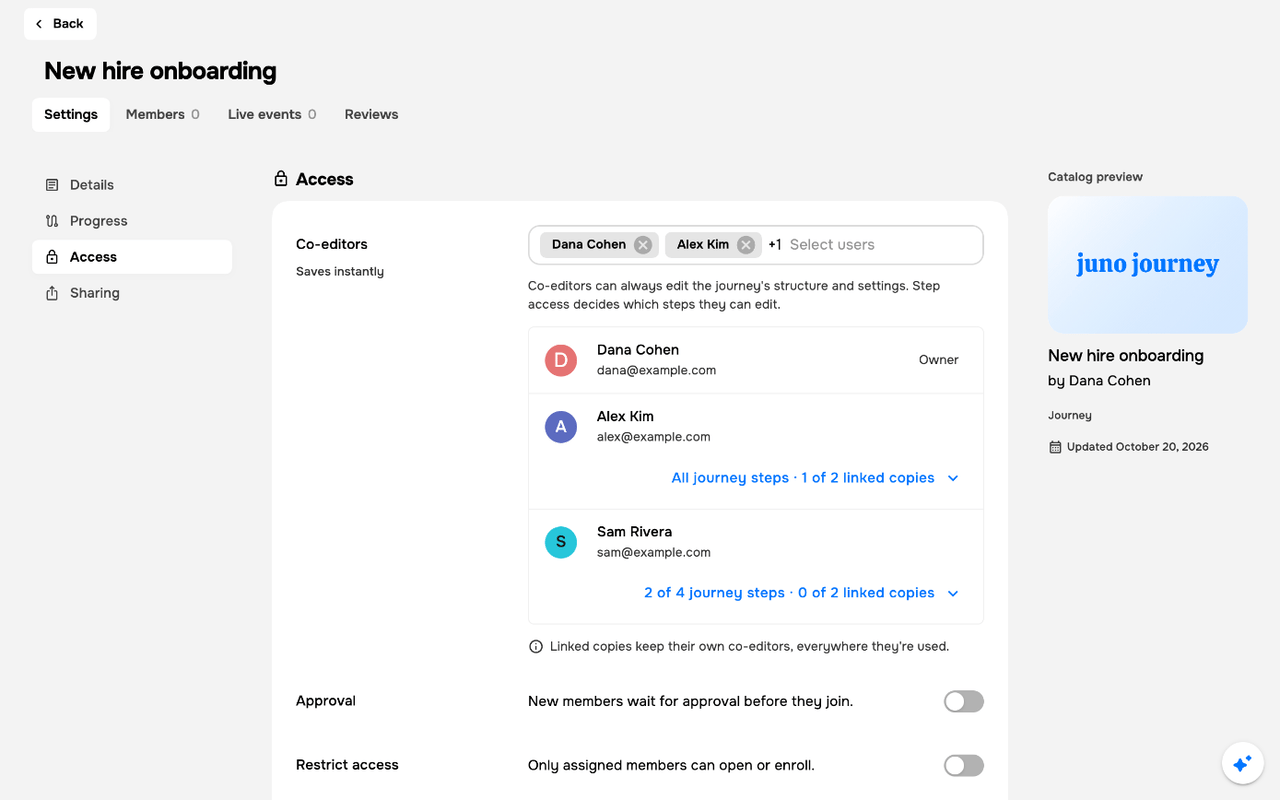
Under the **Co-editors** picker, a list shows the Journey's owner and each co-editor, with their access:
| Label | Meaning |
| - | - |
| **Owner** | Created the Journey and always edits its own steps |
| **All journey steps** | Edits every step built in the Journey |
| **N of M journey steps** | Edits N of the Journey's M own steps |
When the Journey has linked copies, each co-editor's label also shows how many of them they co-edit, even none, such as **All journey steps · 0 of 2 linked copies** or **2 of 4 journey steps · 1 of 2 linked copies**.
Select a co-editor's label to open **What can *name* edit?** again and change their access. When the Journey has linked copies, the note under the list reads **Linked copies keep their own co-editors, everywhere they're used.**
***
## The co-editor list
Under the **Co-editors** picker, a list shows the Journey's owner and each co-editor, with their access:
| Label | Meaning |
| - | - |
| **Owner** | Created the Journey and always edits its own steps |
| **All journey steps** | Edits every step built in the Journey |
| **N of M journey steps** | Edits N of the Journey's M own steps |
When the Journey has linked copies, each co-editor's label also shows how many of them they co-edit, even none, such as **All journey steps · 0 of 2 linked copies** or **2 of 4 journey steps · 1 of 2 linked copies**.
Select a co-editor's label to open **What can *name* edit?** again and change their access. When the Journey has linked copies, the note under the list reads **Linked copies keep their own co-editors, everywhere they're used.**
 ***
## Remove a co-editor
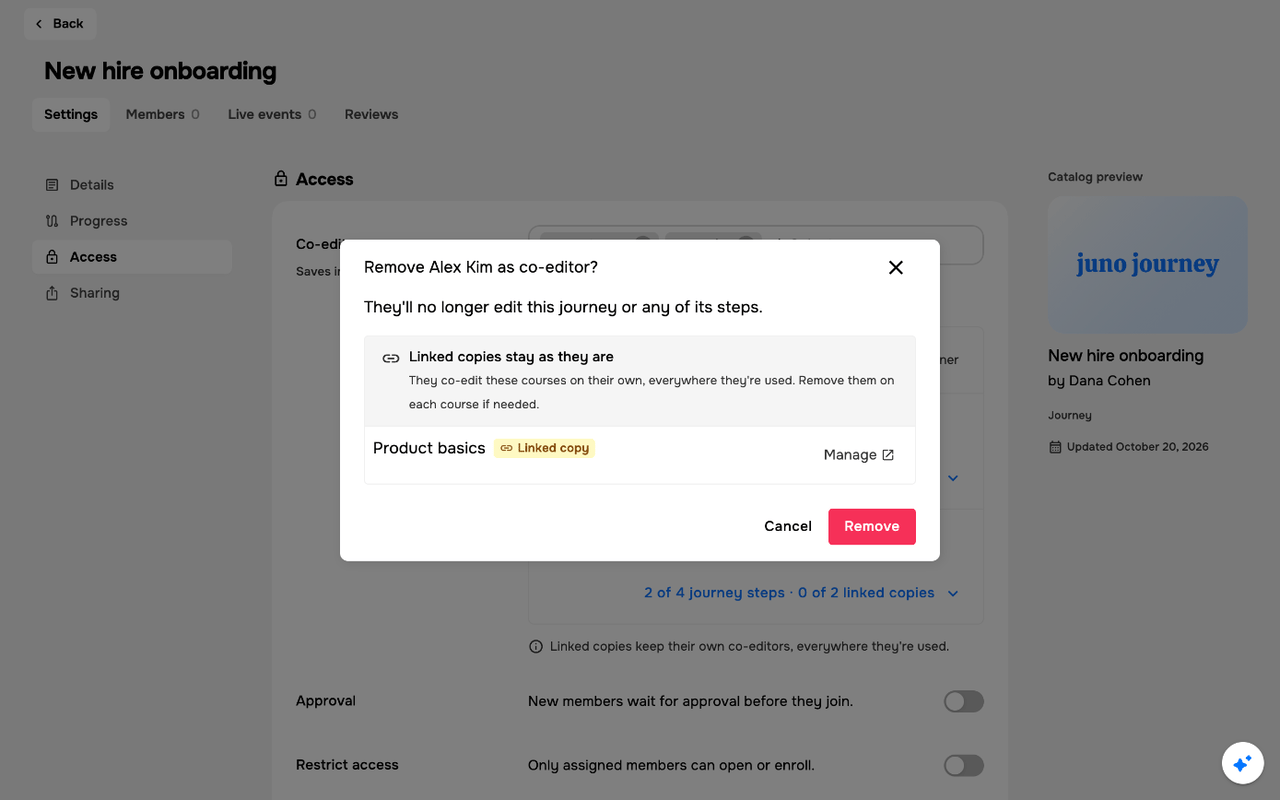
Remove the person from the **Co-editors** picker, or select **Remove from journey** in **What can *name* edit?**. Either way, Juno asks you to confirm first, with **Remove *name* as co-editor?** (or **Remove N co-editors?** when you remove several). Select **Remove** to confirm, or **Cancel** to keep them. A Journey always keeps at least one co-editor, so **Remove from journey** doesn't show for the last one.
Removing someone takes them off the Journey and all of its own steps. Linked copies they co-edit stay as they are: the dialog lists them under **Linked copies stay as they are**, with a **Manage** link on each course you can edit. To remove them from a linked copy too, do it on that course.
***
## Remove a co-editor
Remove the person from the **Co-editors** picker, or select **Remove from journey** in **What can *name* edit?**. Either way, Juno asks you to confirm first, with **Remove *name* as co-editor?** (or **Remove N co-editors?** when you remove several). Select **Remove** to confirm, or **Cancel** to keep them. A Journey always keeps at least one co-editor, so **Remove from journey** doesn't show for the last one.
Removing someone takes them off the Journey and all of its own steps. Linked copies they co-edit stay as they are: the dialog lists them under **Linked copies stay as they are**, with a **Manage** link on each course you can edit. To remove them from a linked copy too, do it on that course.
 ***
## What a limited co-editor can do
A co-editor with **Selected journey steps**:
* Edits the Journey's structure and settings, plus only the steps they were given
* Opens the Journey's other steps in preview only
* Can't change who edits the Journey or its owner. In **Settings** › **Access** they see the co-editor list read-only, with the note **You can edit some of this journey's steps. Only the journey's owner or an admin can change who edits it.**
Linked copies follow their own co-editors. A limited co-editor edits a linked copy only if they co-edit that course.
***
## The Journey owner
The person who created the Journey always edits its own steps, including steps other people built, even if they aren't on the co-editor list. Linked copies keep their own co-editors, so the owner edits one only if they can edit that course.
This documentation is built and hosted on [Mintlify](https://mintlify.com), a developer documentation platform.
***
## What a limited co-editor can do
A co-editor with **Selected journey steps**:
* Edits the Journey's structure and settings, plus only the steps they were given
* Opens the Journey's other steps in preview only
* Can't change who edits the Journey or its owner. In **Settings** › **Access** they see the co-editor list read-only, with the note **You can edit some of this journey's steps. Only the journey's owner or an admin can change who edits it.**
Linked copies follow their own co-editors. A limited co-editor edits a linked copy only if they co-edit that course.
***
## The Journey owner
The person who created the Journey always edits its own steps, including steps other people built, even if they aren't on the co-editor list. Linked copies keep their own co-editors, so the owner edits one only if they can edit that course.
This documentation is built and hosted on [Mintlify](https://mintlify.com), a developer documentation platform.