> ## Documentation Index
> Fetch the complete documentation index at: https://docs.junojourney.com/llms.txt
> Use this file to discover all available pages before exploring further.
# My Learning
> Your personal learning library — in-progress content, completed items, and assigned learning.
export const RelatedPages = ({pages = []}) => {
if (pages.length === 0) return null;
return <>
Related articles
{pages.map(page => )}
;
};
## My Learning
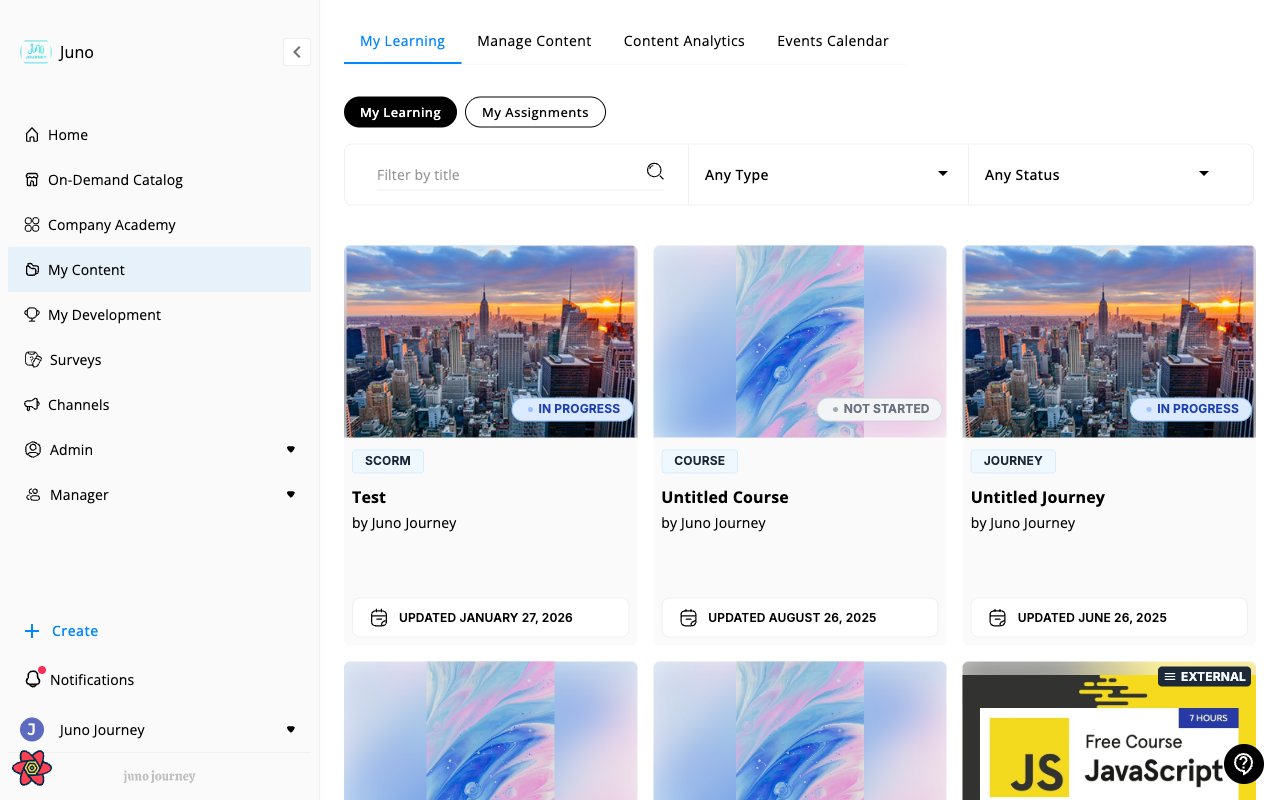
Access your learning from **My Content** in the sidebar → **My Learning** tab. This is your personal view of everything you're learning or have learned.
 ***
## Filtering and search
Use the filters at the top to find specific content:
* **Search by title** — type in the search bar to filter by content name
* **Type** — filter by content type (Course, Quiz, Journey, SCORM, etc.)
* **Status** — filter by progress status
* **Sort** — order results by Best Match, date, or other criteria
* **Clear all** — reset all filters
***
## How learning gets added
Content appears in your library when you:
* Self-enroll from the Company Academy or On-Demand Catalog
* Are assigned learning by a manager or admin
* Start a Journey
See [Content Types](/learning/units-and-courses) for a full breakdown of what you might find.
***
## Resuming learning
Click any in-progress item to pick up where you left off. For Journeys with multiple steps, Juno tracks your position at the unit level — you'll land on the next incomplete step.
Once you're inside a Journey, the left sidebar shows a **completion indicator** for each step so you can see how far along you are and jump back to any partially complete step. See [Tracking progress in the sidebar](/learning/learning-paths#tracking-progress-in-the-sidebar).
***
## Certificates
When you complete a Journey or Course with a certificate attached, Juno may issue a certificate. Certificates can be downloaded as PDF.
See [Certifications](/learning/certifications) for details.
***
## My Assignments
Learning assigned to you by a manager or admin appears in **My Assignments** — a separate view focused on required work with due dates.
See [My Assignments](/learning/my-assignments) for details.
***
## Filtering and search
Use the filters at the top to find specific content:
* **Search by title** — type in the search bar to filter by content name
* **Type** — filter by content type (Course, Quiz, Journey, SCORM, etc.)
* **Status** — filter by progress status
* **Sort** — order results by Best Match, date, or other criteria
* **Clear all** — reset all filters
***
## How learning gets added
Content appears in your library when you:
* Self-enroll from the Company Academy or On-Demand Catalog
* Are assigned learning by a manager or admin
* Start a Journey
See [Content Types](/learning/units-and-courses) for a full breakdown of what you might find.
***
## Resuming learning
Click any in-progress item to pick up where you left off. For Journeys with multiple steps, Juno tracks your position at the unit level — you'll land on the next incomplete step.
Once you're inside a Journey, the left sidebar shows a **completion indicator** for each step so you can see how far along you are and jump back to any partially complete step. See [Tracking progress in the sidebar](/learning/learning-paths#tracking-progress-in-the-sidebar).
***
## Certificates
When you complete a Journey or Course with a certificate attached, Juno may issue a certificate. Certificates can be downloaded as PDF.
See [Certifications](/learning/certifications) for details.
***
## My Assignments
Learning assigned to you by a manager or admin appears in **My Assignments** — a separate view focused on required work with due dates.
See [My Assignments](/learning/my-assignments) for details.