

The distinction
When you add existing content to a training (a Journey, course, or channel), Juno presents the choice inline — every row gives you a Duplicate button and a Linked Copy button so you pick per item.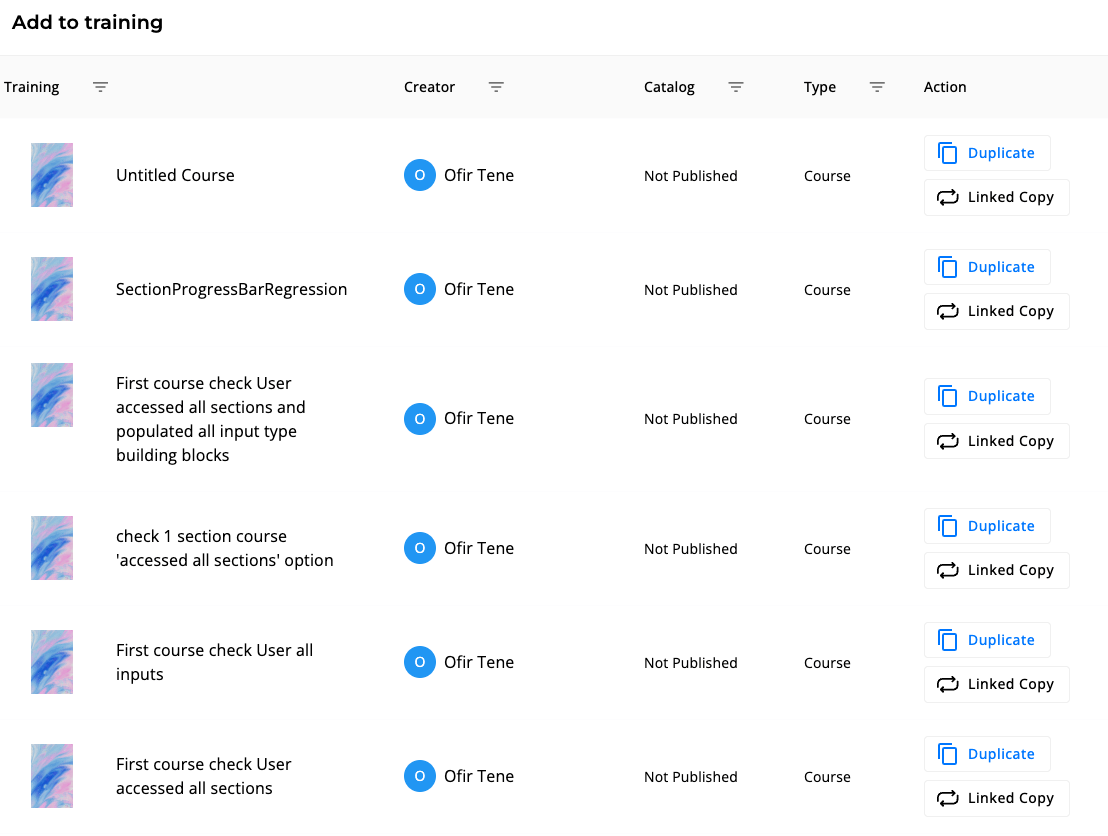
Pick Linked Copy when you want a single source of truth (e.g., a shared “Onboarding” course used by several Journeys). Pick Duplicate when you want a starting template that can diverge.
Duplicate — independent copy
Use when you want a fresh starting point that won’t track back to the original. What happens:- A new unit is created with the same content as the original
- The new unit is its own unit, with its own analytics and its own enrollment list
- Editing the duplicate does not affect the original
- The original’s enrollments, completions, and historical analytics are not carried over
- Open the unit’s settings and stay on the General tab
- Under the unit’s Actions (for example Course Actions), select Duplicate. The button appears for standalone units, not for a step inside a Journey.
- The duplicate opens — rename, edit, and publish independently
Duplicating a Journey duplicates the Journey container but not the underlying steps if those steps are themselves reused units. Reused steps stay linked to their source.
Reuse — linked copy
Use when you want the same content to appear in multiple Journeys, channels, or contexts, with edits propagating everywhere it’s used. What happens:- A reference to the original unit is added to the new location (Journey step, channel, etc.)
- It is still the same unit, not a new one
- Edits to the reused unit are visible everywhere it appears
- Enrollment and analytics aggregate across all reuse locations
- In the Journey editor, select Add step, then Reuse. The Add to training dialog opens.
- Filter the list by name, creator, catalog status, or type
- Select Linked Copy on the unit you want — it is now linked into this Journey
If you reuse a unit and then someone edits the underlying course, every Journey that reuses it sees the new version on next load. This is intentional — content owners control the canonical version.
When to use which
Sharing and co-creators
Reuse and Duplicate handle copying. Sharing is the third axis — granting others the ability to edit a unit you own. Open any unit and click the Share button to:- Invite co-editors — they can edit the unit alongside you
- Invite viewers — read-only access
- Grant per-step roles in a Journey (different co-editors per step)
Share permissions are unit-level, not workspace-level. A co-editor on Course A has no rights on Course B unless explicitly added.
Sharing a unit into other workspaces
If your organization manages sub-workspaces, there is a fourth option. In a unit’s Permission & Control tab, the Share to Workspaces card makes the unit available in other workspaces’ company catalogs. It is a read-only copy there: the owner keeps editing the original, and each workspace’s admins assign their own people. Selecting Stop sharing removes the unit from a workspace right away, for all its learners. Journeys, courses, quizzes, SCORM units, and tasks can be shared. Learners in the receiving workspace see a shared Journey’s step content and their own step statuses. To share or unshare many units at once, see Content Management.Sharing between workspaces may not be enabled for your organization. It must be on in both the sharing and the receiving workspace.
What this means for governance
- Reuse centralizes ownership. Good for compliance, brand voice, and content the org wants to keep consistent.
- Duplicate decentralizes ownership. Good for teams that want autonomy and don’t need updates to follow the original.
- Share is orthogonal — both reused and duplicated units can have co-editors.