

What is a goal?
A goal in Juno is a structured development objective with action items, target skills, a timeline, and optional mentor support. Goals help you track professional growth — whether learning a new skill, preparing for a role change, or hitting a business target.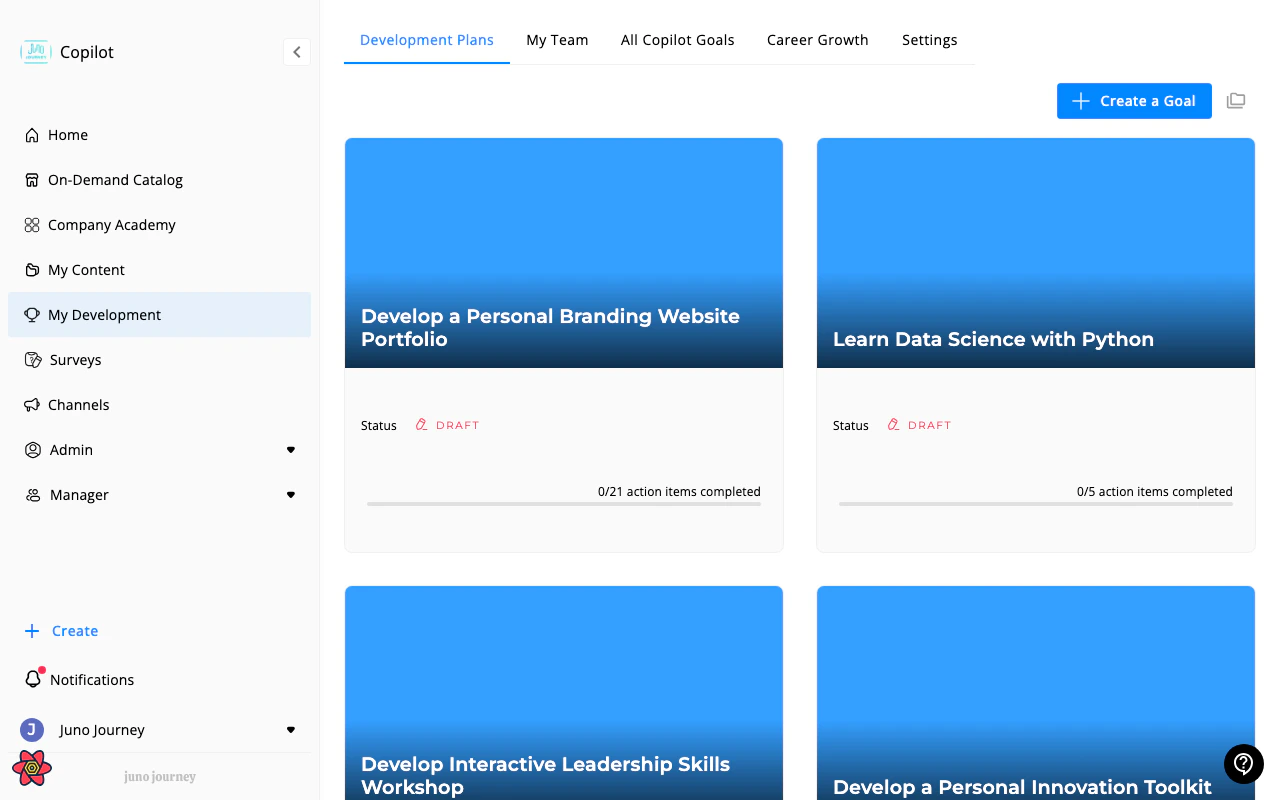
Creating a goal
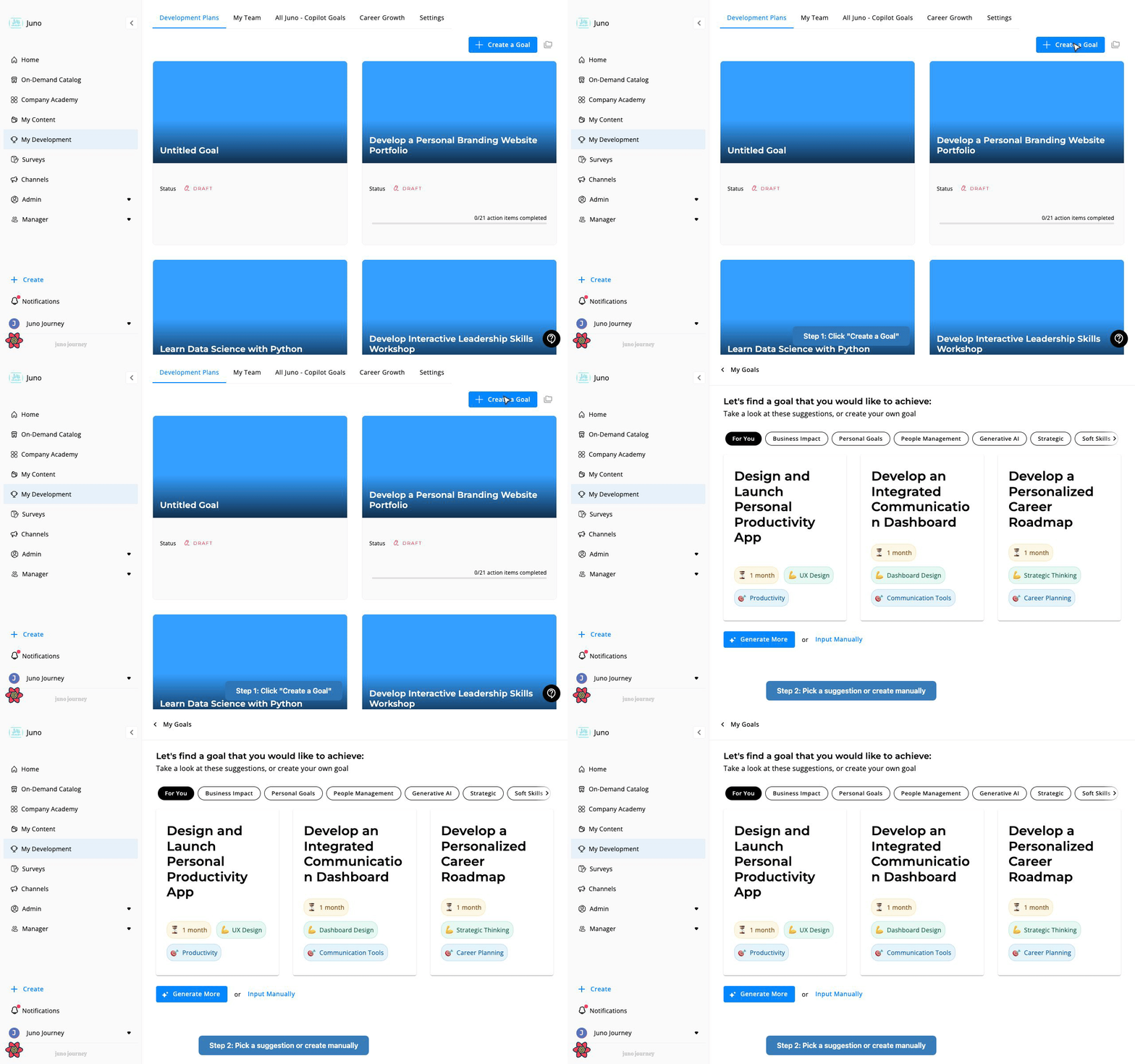
Select Create a Goal on the Development Plans tab of My Development.1
Select Create a Goal
Juno opens a new draft goal and asks what you’d like to achieve.
2
Pick a suggestion or write your own
Juno suggests goals in category tabs, such as For You or Business Impact. Select a suggestion that fits. To write your own, select Input Manually, type your goal (up to 120 characters), and select Done.
3
Review and edit your program
The goal opens with action items that Juno generated. Edit them, add your own, and set a time frame.
4
Launch
Select Launch Program to make the goal active. A short dialog can ask you to add a learning partner or request budget, depending on your organization’s settings. Then select Launch.
If you select Create a Goal and leave before choosing a goal, Juno removes the empty, untitled draft automatically. Goals with a title or action items aren’t removed.
Time frame
Choose 2 weeks, 1 month, 3 months, or 6 months, or pick a Custom date. The default is 3 months. A preset time frame counts from the day you launch the goal.Create a goal from a position
If your organization uses Career Paths, you can start a goal from a role — your current one or one you want to grow into. Juno compares your self-assessment with what the position expects and suggests where to focus.1
Open a position
In Career Growth, select the position you’re interested in. Its description, skills, and competencies appear.
2
Rate yourself
Move the sliders to set your level on each skill, and answer the competencies questionnaire. Your answers show where you are today compared with the position.
3
Select Grow My Career
Juno lists the skills where your level is below what the position expects, and the competencies where you rated yourself in the lower half of the scale. Items you haven’t rated yet are included.
4
Pick up to five
Check the ones that matter most to you. Once you’ve picked five, the others are unavailable until you uncheck one.
5
Select Create a Goal
Juno creates the goal and opens it.
- Leads with what you picked. Juno writes a title that names your selected skills and competencies, and adds the date. The action items focus on them too.
- Stays about growth, not promotion, for your current role. If you started from your own position, the goal is about strengthening those skills in your role, not moving to a different one.
- Includes your selection. The skills and competencies you checked are added to the goal, with the position’s expected levels.
- Has a 3-month time frame, which you can change.
Goal lifecycle
Action items
Each goal contains action items — the specific tasks you need to complete. Action items fall into three categories:
Action items can link to:
- Internal content — courses from your Company Academy
- External content — courses from the On-Demand Catalog
- External links — any URL
- General tasks — freeform to-do items
Skills and competencies
Goals can include skills and competencies you’re working to develop. Select Add skill on a goal to add skills. When you create a goal from a position, the skills and competencies come from that position. Skill levels use your organization’s skill levels. By default they are Beginner, Junior, Proficient, Senior, and Expert. Skills in your goals connect to your organization’s competency framework — see Competencies & Skills.Experts and learning partners
Goals support two types of support relationships. Both are available when your admin turns on the learning partner setting. See Development Settings. Expert (mentor):- You invite an expert from Learn with on the goal page. Select Choose to pick one
- The expert receives a notification and can accept or reject
- Once the expert accepts, they can view your goal and track your progress
- Experts see the goals they support in a dedicated Goals I Support view
- A colleague who supports your development
- If your goal has no expert, launching it includes an Add a learning partner step
- Your learning partner can see your goal and your ongoing progress
Who can see your goals?
Team goals for managers
Managers see two extra tabs in My Development: My Team and My Team Goals. Both tabs are hidden on small screens.My Team
My Team lists everyone in your reporting line, including indirect reports. Inactive people aren’t shown.
Filter by name, direct manager, or last updated date. Sort by name, direct manager, or last updated.
Open a team member
Select View Goals to open a person’s page. It has these tabs:
Use the back arrow next to their name to return to My Team.
Create a goal for a team member
Select Create Goal in the Goals column, or Create a Goal for on the person’s page. The flow matches creating your own goal, titled “Let’s find a goal for” the person. Juno notifies them that you created a goal for them.My Team Goals
My Team Goals is a table of the goals of the people you manage. It works like Organization goals without the bulk upload.Organization goals
Admins see an All Goals tab, such as All Acme Goals, with every goal in the organization. Managers see the same table as My Team Goals, limited to the people they manage.
Filter most columns from their headers and sort the table. Select a row to open the goal. Select Export to download the table as an Excel file.
Bulk upload goals
Admins can create many goals at once with Upload from CSV.1
Upload your file
In Bulk Upload Goals, upload a CSV or Excel file. The first row must hold column names. Select Download Template to start from the Juno template.
2
Map the columns
In Map Goal Columns, match your columns to Juno fields. Only Goal and User Email are required. The other fields are Description, Action Items, End Date, and Focus Area. Juno tries to match the columns for you.
3
Confirm the import
Review the list of goals. Rows missing a goal title or a user email are skipped. Select Import Goals.
4
Check the results
Import Results lists the goals that were imported and the ones that failed, with the reason. Select Download Failed Goals to fix and retry them.
- Separate several action items in one cell with commas or semicolons.
- Save CSV files as UTF-8. Goal titles with accents or non-Latin letters then import correctly.
- If the end date is blank or Juno can’t read it, the goal gets a 3-month time frame.
- Focus Area accepts balanced, professional, or business. Other values are ignored.
Notifications
Completing a goal
When you complete every action item on a launched goal, Juno marks it Completed. This:- Records the completion date
- Notifies your manager, if your admin turned on Manager Goal Notifications
- Shows a Goal Achieved! card